Private Cheats for WarDogs (Hacks)
Time‑tested and undetected solutions for total control of territories on the map.
List of Cheats for WARDOGS
WARDOGS — a dynamic multiplayer shooter where gunfights, territory control, and the smart use of available vehicles are of great importance. The fast pace of matches and the large amount of action on the map force you to constantly watch your surroundings and react to enemy actions in a timely manner. Private cheats for WARDOGS expand the standard set of game information and add additional tools for managing combat. The most in-demand features are Aimbot, ESP / Wallhack, various visual modifications, and a Mod Menu that combines all capabilities in one interface.
Interested in WARDOGS cheats? Check out other sections of our store: "Delta Force Cheats", "Battlefield 6 Cheats", "Battlefield 2042 Cheats", "The Finals Cheats", "Call of Duty Warzone Cheats".
Aimbot, Aim Assistance for WARDOGS
In the fast-paced gunfights of WARDOGS, even a slight delay in aiming can decide the outcome of an encounter. Aimbot automates aiming at selected targets and allows you to track enemies more accurately while they move. At the same time, modern private solutions offer quite flexible settings, so the feature can be adapted to different weapon types and in-game situations.
The user can independently choose the aimbot's area of operation, aiming speed, activation key, and other parameters. This allows you to set up both smoother target tracking and fast target acquisition in intense firefights.
Main Aimbot Features
- Enable Aimbot — enables and disables automatic aiming.
- Aim Key — assigns a key to activate the feature.
- Aim FOV — adjusts the area in which the aimbot searches for suitable targets.
- Aim Speed — adjusts the speed of aiming at an enemy.
- Smoothness — adjusts the smoothness of the crosshair movement.
- Target Selection — selects the priority target.
- Bone Selection — selects the aim point, such as the head or body.
- Visibility Check — works only with targets that can be detected.
- Maximum Distance — limits the aimbot's range.
- Target Lock — keeps the selected enemy as the current target.
- Hotkey — quickly toggles the feature directly during a match.
By combining these parameters, Aimbot for WARDOGS can be configured for various scenarios. For close combat, it is convenient to use a higher acquisition speed, while for long-range firefights you can reduce the FOV and increase tracking smoothness.
ESP & Wallhack for WARDOGS
ESP / Wallhack is designed to expand information about what is happening around the player. Instead of relying solely on visual contact, the user receives additional indicators that show the positions of enemies and vehicles.
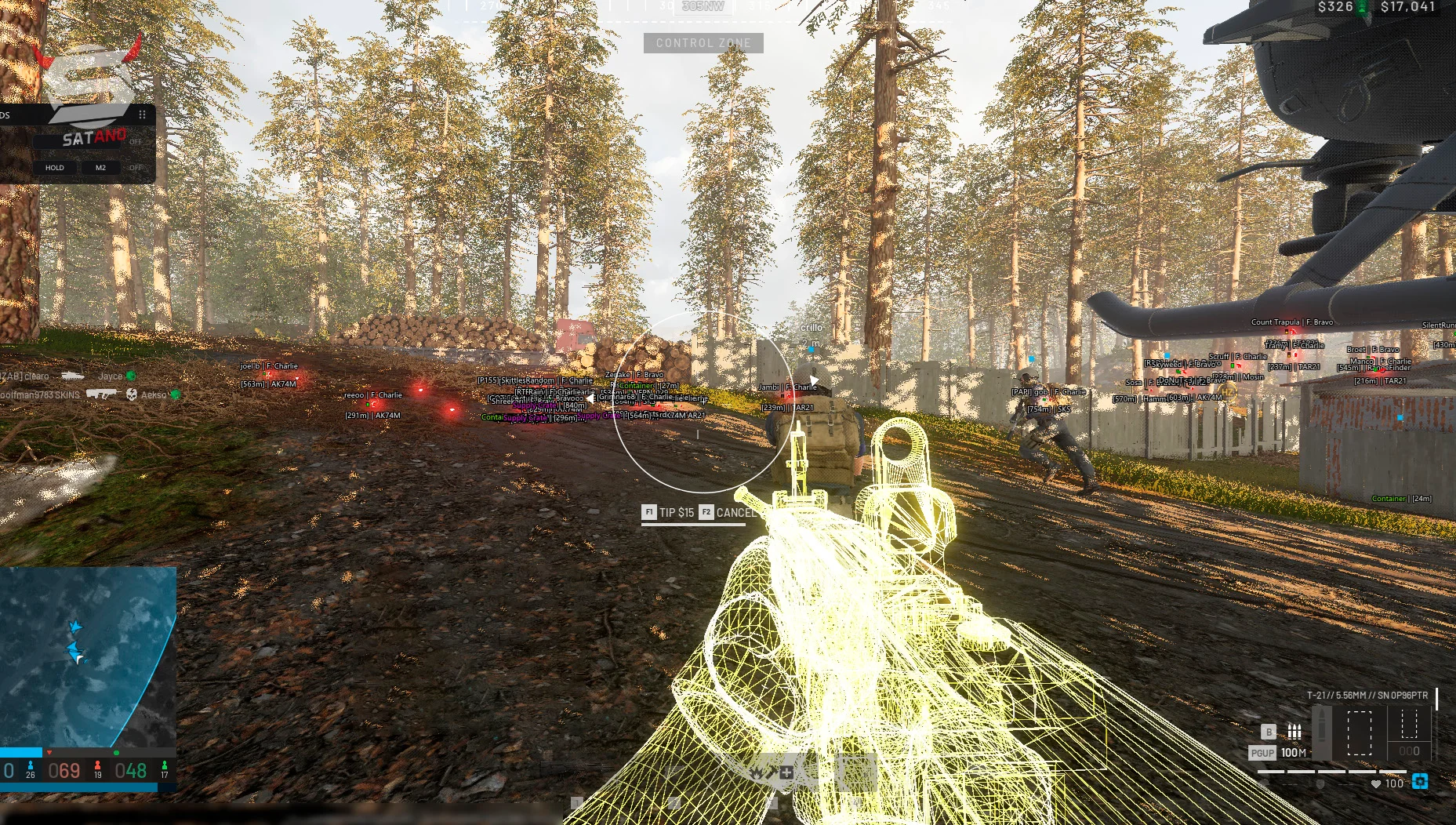
Depending on the selected cheat, you can separately configure the display of various object categories, change the ESP working distance, choose the visualization format, and customize your own colors. This approach allows you to leave only the truly necessary information on the screen.
For WARDOGS, it is especially useful to split ESP into players and vehicles: an enemy may not only be directly near you but also moving in a vehicle that must be taken into account when choosing a position.
Player ESP for WARDOGS (WH)
Player ESP shows the location of players regardless of whether they are in direct line of sight. Additional visual elements help you quickly determine the enemy's movement direction, distance, and position relative to surrounding objects.
Main Player ESP settings:
- Player Boxes — boxes around player models.
- Skeleton ESP — display of the character's skeleton.
- Player Names — display of nicknames.
- Distance — distance to the enemy.
- Health Bar — display of health level.
- Snaplines — lines from the screen to detected players.
- Head ESP — separate head marker.
- Visible Check — highlights visible targets.
- Team Check — filters allies and enemies.
- Max Distance — limits display distance.
This set allows you to quickly assess the situation on the map and notice players behind cover or at a significant distance in advance. If necessary, individual elements can be disabled, leaving only the most informative indicators.
Vehicle ESP for WARDOGS
Vehicles are an important part of WARDOGS combat, so a separate Vehicle ESP helps you monitor the movement of vehicles and receive information about their location in advance.
Depending on the specific product, different types of vehicles may be displayed, as well as additional information about them.
Main features:
- Vehicle ESP — display of vehicles on the map.
- Vehicle Boxes — highlights vehicles with boxes.
- Vehicle Names — display of the vehicle name or type.
- Vehicle Distance — distance to the detected object.
- Vehicle Health — information about the vehicle's condition.
- Vehicle Direction — direction of movement.
- Max Distance — setting the maximum display distance.
The combination of Player ESP and Vehicle ESP provides a more complete picture of what is happening on the battlefield. The player can simultaneously track infantry and vehicles, more quickly identify dangerous directions, and adjust their own position depending on the situation.
Undetected Mod Menu for WARDOGS
Modern private cheats for WARDOGS combine the main features in a single Mod Menu, through which you can control the aimbot, ESP, and additional in-game capabilities. This format is convenient because you do not have to configure each feature separately or use several tools at once — all parameters are located in one interface.
The menu is usually divided into thematic categories, so the desired setting can be found within seconds. The user independently determines which features should run constantly, which are activated only by a hotkey, and which can be completely disabled.
Special attention is paid to configurations. Ready-made settings can be saved for different maps, weapon types, or in-game scenarios, and then quickly switched to the desired profile during the next match.
Aimbot Configuration
The Aimbot section provides the main parameters for automatic aiming:
- Aim FOV — changes the target search area.
- Aim Speed — adjusts aiming speed.
- Smoothness — adjusts the smoothness of crosshair movement.
- Target Bone — selects the priority body part.
- Target Priority — determines the order of target selection.
- Aim Key — assigns the activation key.
- Visibility Check — filters targets based on visibility.
- Maximum Distance — limits the working distance.
This allows the user to create separate presets for different weapon types and quickly change parameters without manually reconfiguring each feature.
ESP Configuration
ESP Manager allows you to define which information will be displayed during the match. Players, vehicles, and various visual elements are adjusted separately.
Available parameters may include:
- Player ESP — display of players.
- Vehicle ESP — display of vehicles.
- Boxes — boxes around objects.
- Skeleton — skeleton models.
- Names — nicknames or object names.
- Distance — distance.
- Health — target condition.
- Snaplines — guide lines.
- Team Check — filters allies.
- Max Distance — maximum display distance.
- Color Settings — individual colors for different categories.
This approach allows you to create a compact ESP for regular matches or, conversely, enable an extended set of indicators if you need the most detailed battlefield information.
Misc Features and Additional Settings
In addition to combat and visual capabilities, the Mod Menu for WARDOGS may include various auxiliary features. They allow you to change individual game parameters and make controls more convenient.
Among the most in-demand features:
- No Recoil — reduces or disables weapon recoil.
- No Spread — reduces bullet spread when shooting.
- Fullbright — increases image brightness and improves visibility in dark places.
- NoClip — free movement through some game objects.
- Speedhack — changes the character's movement speed.
- Chams — additional visual highlighting of models.
- Custom Crosshair — customization of your own crosshair.
- Hotkeys — assigning keys for quick access to features.
- Config System — saving and loading user settings.
Thus, the Mod Menu becomes a single control center for all software. You can separately configure Aimbot, create your own ESP profile, enable the necessary Misc features, and save the resulting configuration for further use.
WARDOGS Hacks & Exploits
In addition to Aimbot and ESP, private solutions for WARDOGS may include additional features related to shooting, movement, and the visual appearance of the game. They are not necessarily used constantly, but in certain situations they can noticeably change the usual controls.
Fullbright / Very Bright Image
Fullbright increases the brightness of the game image and helps you better distinguish objects in dark areas of the map. This feature is especially relevant for locations with limited lighting, where the standard brightness may not be enough.
No Recoil / No Weapon Recoil
No Recoil reduces or completely removes the visual and gameplay weapon recoil. This makes it easier to keep the crosshair on target during prolonged fire and control automatic weapons.
No Spread / No Bullet Spread
No Spread reduces bullet spread. The feature is designed to improve shooting stability and is especially noticeable when using weapons that have significant random spread.
Noclip / Flying Through Walls
Noclip allows you to move freely through certain game obstacles. This is an additional movement feature that can be used to explore the environment or access hard-to-reach areas.
Speedhack / Increased Infantry Speed
With Speedhack, you can change the character's movement speed. The user independently selects the appropriate parameter, adapting the speed to their preferences.
Chams Wallhack / Wallhack Through Walls
Chams is a visual variant of Wallhack in which player models are highlighted with a special material or color. This keeps the enemy silhouette visible even against a complex background.
Together, these capabilities complement the main cheat features and allow you to build an individual configuration for your own playstyle. The specific set of features depends on the selected product and its current version.
Best WARDOGS Cheats — WH-Satano
The WH-Satano catalog features private cheats for WARDOGS with various feature sets. We cooperate with trusted private software developers and keep the presented products up to date. Before purchasing, you can read a detailed description of each cheat, compare available features, and choose an option that meets your own requirements.
Why choose WH-Satano?
- Private cheats for WARDOGS — solutions with an up-to-date feature set.
- Different software options — from simple ESP to multifunctional mod menus with a lot of features.
- Detailed description — the list of features and system requirements are available on each product page.
- Regular updates — support for current software versions for new game patches.
- Technical support — 24/7 assistance with selection and any questions.
- Convenient purchase — the product can be obtained online instantly after order processing.
If you don't know which cheat to choose, focus primarily on the required feature set. For some players, ESP and Aimbot are enough; others will need a full-fledged mod menu with additional settings for weapons, visuals, and movement. Also, you can always contact our support for advice on choosing a product.
How to Buy WARDOGS Hacks in 2026?
Placing an order at WH-Satano takes only a few minutes. Before purchasing, it is recommended to read the product description and make sure that the selected cheat supports the necessary features and the current version of the game.
How to Place an Order
- Open the WARDOGS catalog and go to the available private solutions.
- Select a suitable cheat with the required feature set.
- Read the product description, including features, system requirements, and possible limitations.
- Choose a plan if the product offers several subscription options.
- Click the "Buy" button and proceed to checkout.
- Provide the necessary details to receive your order.
- Choose a convenient payment method from the available options.
- Confirm your purchase and wait for the payment to be processed.
- Get access to the product and instructions on how to use it.
- Install and configure the cheat according to the user manual.
If you have any questions while choosing a product or after purchase, you can contact WH-Satano technical support.
Safe WARDOGS Cheats
WARDOGS combines fast gunfights, infantry encounters, and the use of vehicles, so situational awareness and shooting accuracy are of great importance. Private software allows you to expand the standard game capabilities with Aimbot, ESP / Wallhack, and various additional features. The main solutions for WARDOGS combine visual tools with capabilities such as No Recoil, No Spread, Fullbright, Noclip, Speedhack, and Chams, and all parameters are managed through a single Mod Menu.
In the WH-Satano catalog, you can choose a suitable product depending on the required feature set, learn about its capabilities, and complete the purchase in just a few steps. Before buying, it is recommended to carefully check the current list of supported features and compatibility with your game version.
Frequently asked questions about cheats for WARDOGS
If you want to earn in-game money faster in WARDOGS, private cheats can help you act more effectively during matches. Aimbot makes it easier to lock onto enemy targets, while ESP provides information about the location of players and helps you assess the situation on the map in advance. For a more aggressive playstyle, some users choose rage settings for the aimbot, such as an increased FOV and faster target acquisition. At the same time, for a more careful game, you can use smooth settings or limit yourself to ESP, relying on additional information about opponents, their positions, and their actions. It is important to note that the set of available functions and their effectiveness depend on the specific mod menu or cheat.
Chams Wallhack is a visual feature that changes the way player models are displayed through walls. Characters can be highlighted with colored materials, special textures, outlines, or a glow effect, which makes them more noticeable relative to the surrounding space.
ESP for WARDOGS can provide significantly more information than a regular Wallhack. In addition to the classic Box ESP — frames around player models — the function can include a whole range of additional visual indicators.
Depending on the specific product, ESP can display:
- Box ESP — boxes around players;
- Visible Check — different colors for visible targets and players behind cover;
- Skeleton ESP — displays the model’s skeleton;
- Health Bar — displays the player’s health level;
- Distance ESP — displays the distance to the target;
- Weapon ESP — displays the active weapon in the player’s hands;
- Money ESP — displays the available in‑game currency;
- Player Name — displays the player’s name or ID;
- Snaplines — lines indicating the direction to the target;
- Offscreen Arrows — pointers to players outside the screen.
Thanks to the large amount of available information, ESP allows you to better understand what is happening and choose a more thoughtful approach to action. At the same time, the user can usually disable unnecessary elements themselves so as not to overload the screen.
At the moment, there is no information about confirmed hardware bans in the game WARDOGS, but it is possible that this type of sanction may appear in the future. For greater security, it is recommended to use a third‑party spoofing tool to hide the serial numbers of your main computer.
Recent reviews of our cheats for WARDOGS

мяукуч
A simple yet stable cheat that doesn't tamper with the game's memory.
Arthur
Excellent software, most importantly, it's from a trusted provider and developer, and it's also very easy to launch. Running the software on the latest versions of Windows 11 is a masterpiece. Windows 11 (21H2, 22H2, 23H2, 24H2, 25H2).