Private Cheats for My Hero Ultra Rumble (Hacks)
Reliable hack for the game My Hero Ultra Rumble in the WH-Satano store!
List of Cheats for My Hero Ultra Rumble
My Hero Ultra Rumble — a team battle royale in the My Hero Academia universe, where several teams fight on the same map using the unique abilities of their heroes. Each character has their own set of Quirk Skills, and victory depends not only on individual skill but also on interaction with allies, positioning, and smart use of available resources. Matches take place in a constantly changing environment: teams move around the map, search for power-up items, engage in clashes, and try to outlast the other participants. At the same time, even a strong character can find themselves at a disadvantage if the enemy discovers their position first or gains access to the necessary items.
That is why paid software for My Hero Ultra Rumble may be of interest to players who need a more informative interface and additional control tools. Depending on the chosen solution, Aimbot, Player ESP, Loot ESP, as well as various Mod Menu settings and configurations are available. Below we will examine the main features of such software and consider which functions may be available for the PC version of My Hero Ultra Rumble.
Interested in MHUR cheats? Check out other sections of our store: "Cheats for Seven Deadly Sins", "Genshin Impact Cheats", "NTE Cheats", "Valorant Cheats", "Marvel Rivals Cheats".
Aimbot, Aim Assistance for My Hero Ultra Rumble (MHUR Aim Bot)
In My Hero Ultra Rumble, each hero has their own combat characteristics, but accuracy and aiming speed remain important components of any encounter. Aimbot is designed to automate aiming at a selected enemy and can be used with various game characters.
The main feature of this solution — a large number of customization parameters. The user can independently define the activation key, target search area, aiming point, crosshair movement smoothness, and maximum operating distance.
Main Aimbot Settings
- Enable — enable or disable the function.
- Keybind — assign the activation key.
- Adaptive FOV — adaptive target search area.
- Draw FOV Border — display the boundary of the working area.
- Draw FOV Background — visual display of the FOV area.
- Bone — select the model point for aiming.
- FOV Size — change the search zone size.
- Smoothness — adjust crosshair movement smoothness.
- Max Distance — limit the maximum distance.
The FOV setting determines how widely Aimbot should search for potential targets. At the same time, visually displaying the FOV border helps control the working area directly during the game.
Smoothness is responsible for the nature of crosshair movement, and the Bone parameter allows you to select the corresponding part of the character model. Maximum distance, in turn, limits the function's operation at long range.
Thus, Aimbot for My Hero Ultra Rumble is not one fixed function, but a set of parameters with which you can create your own aiming configuration.
ESP, Wallhack for My Hero Ultra Rumble (WH)
Players ESP provides additional information about the location of match participants. For a battle royale game, this is especially relevant, since enemies may be at a considerable distance or remain behind environmental objects.
Instead of a single display mode, the user can customize the appearance of ESP and select the necessary visual elements. The reference includes several options for representing players: boxes, fill, skeleton, lines, name, and distance to target.
Main Players ESP Features
- ESP Style — select display style.
- Bounding Box — box around the player model.
- Box Fill — fill the area inside the box.
- Skeleton — display the character's skeleton.
- View Line — line showing view direction.
- Line to Enemy — line from player to enemy.
- Name — display name.
- Distance — distance to target.
- Show Team — display team information.
- Max Distance — limit ESP range.
It is not necessary to use all elements at the same time. For example, you can leave only boxes and distance, or enable Skeleton and guide lines for a more detailed display of enemies.
Show Team allows you to take into account which team characters belong to, and the Max Distance limit helps control the number of objects displayed on screen.
Thanks to this system, ESP for My Hero Ultra Rumble performs not only the function of Wallhack but also acts as an additional information layer. The user gets the ability to see player positions, their distance, and other available visual parameters without overloading the interface with unnecessary elements.
MHUR Loot Wallhack (Items ESP)
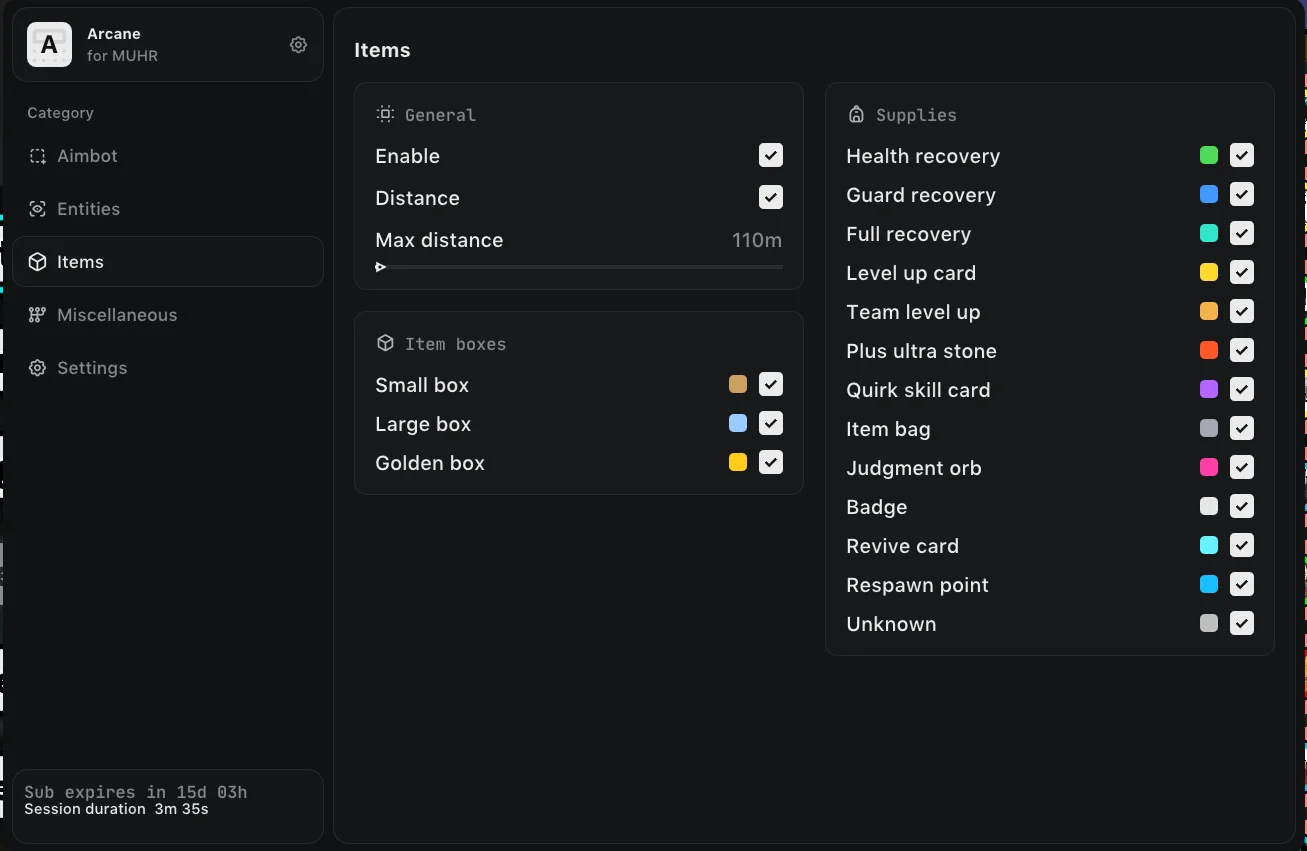
In My Hero Ultra Rumble, it is important not only to see enemies but also to quickly navigate available resources. Items ESP helps track items on the map and get additional information about found loot. This is especially convenient in situations where you need to quickly pick up the right resource and not waste time examining each item separately.
Items ESP settings include the parameters Enable, Distance, and Max Distance. You can enable item display, show the distance to them, and limit the radius in which information will be displayed on screen.
Separate display is provided for item boxes:
- Small Box — show small boxes;
- Large Box — display large boxes;
- Golden Box — location of golden boxes.
This division allows you to quickly understand which objects are nearby and choose points of interest to explore.
Items ESP also supports separate categories of consumable and useful items:
- Health Recovery — health recovery;
- Guard Recovery — guard recovery;
- Full Recovery — full recovery;
- Level Up Card — level-up card;
- Team Level Up — team level up;
- Plus Ultra Stone — Plus Ultra Stone;
- Quirk Skill Card — Quirk Skill Card;
- Item Bag — item bag;
- Judgment Orb — Judgment Orb;
- Badge — badge;
- Revive Card — revive card;
- Respawn Point — respawn point;
- Other — other items.
Thanks to category filtering, Items ESP can be configured to suit your own playstyle, leaving only truly important loot types on screen.
MHUR Hacks, Exploits, Cheats (My Hero Ultra Rumble)
In addition to Aimbot and ESP, cheats for My Hero Ultra Rumble may include a set of additional functions that expand character capabilities and allow changing certain gameplay parameters. Here you will find tools for movement, defense, and working with in-game resources.
Speedhack
Speedhack increases character movement speed. The function allows you to move around the map faster, reduce time between positions, and change direction more quickly.
Noclip
Noclip disables standard character movement restrictions. With its help, you can pass through obstacles and objects that normally block movement.
Flyhack
Flyhack allows you to move around the map in the air, significantly expanding standard movement capabilities. The function can be used to quickly move between different areas of the map.
Godmode
Godmode provides increased protection for the character from taking damage. When activated, the function changes the standard survival mechanics, allowing you to stay in combat longer.
Teleport
Teleport allows you to instantly move the character to a selected point or change their current position. This significantly reduces travel time around the map and helps quickly change location.
Infinite Shield
Infinite Shield provides an unlimited shield reserve. The defensive resource is not consumed in the standard way, thanks to which the character gains additional resilience during clashes.
Together, these functions significantly expand the standard capabilities of My Hero Ultra Rumble. The user gets not only tools for dealing with enemies and loot but also additional options for movement, defense, and managing in-game resources.
Skin Changer for My Hero Ultra Rumble
Skin Changer for My Hero Ultra Rumble allows you to change the character's appearance without having to use the standard set of available cosmetic items. The function is intended for players who want to get access to all hero design options and change their appearance directly during the game.
The skin changer works as a separate tool inside the cheat or mod menu and provides a convenient way to select the desired skin. Instead of a long search for a suitable option in the standard interface, you can use the cosmetic settings available in the software.
Main Skin Changer Features:
- Skin selection — change the character's current appearance.
- Option switching — ability to change available cosmetic options without reconfiguring the entire cheat.
- Apply selected look — activate the desired skin directly through the Skin Changer interface.
- Convenient control — all available parameters are collected in one place and do not require a separate third-party tool.
The skin changer especially complements the Mod Menu for My Hero Ultra Rumble, combining cosmetic capabilities with Aimbot, ESP, Loot ESP, and other cheat functions. As a result, the user gets a single interface through which they can manage both game functions and the character's appearance.
Working & Safe Mod Menu for My Hero Ultra Rumble
Mod Menu combines the main cheat capabilities in a single interface. Instead of scattered settings, the user gets centralized access to Aimbot, Players ESP, Items ESP, and additional parameters.
A separate settings block is responsible for the appearance and control of the menu itself.
The configuration includes:
- Menu Keybind — key to open the menu;
- Unload Keybind — key to unload the menu;
- DPI Scale — interface scale adjustment for different screen resolutions;
- FPS Limit — limit the frame rate of the game or overlay;
- Theme — select design theme (light/dark/other color);
- Language — select interface language (for example: English, Chinese, Russian).
For example, you can create one set of settings for more careful play with a minimal number of visual elements, and another for the most informative ESP display. All necessary parameters are saved in configurations and can be quickly switched through the menu.
PC Cheats for My Hero Ultra Rumble (Computer)
PC cheats for My Hero Ultra Rumble are aimed at players who want to get an expanded set of functions directly during a match. One solution can combine Aimbot, Player ESP, Loot ESP, and mod menu settings.
The main advantage of a comprehensive cheat is that the user does not have to choose only one feature. You can simultaneously use aim automation, get additional information about enemies, and control items located around you.
For different game situations, you can change FOV, Smoothness, Bone, ESP distance, and displayed loot categories. Thanks to this, settings can be made more minimalistic or, conversely, as informative as possible.
Best Undetected Hacks for My Hero Ultra Rumble — WH-Satano
When choosing private software for My Hero Ultra Rumble, it is important to consider not only the set of functions but also the reliability of the store, quality of support, and ease of purchase. WH-Satano is a service with many years of experience that combines a wide selection of software, clear terms, and user support.
Why people choose WH-Satano:
- Experience and trust — the store has been operating on the market since 2015; over this time, it has built a large base of regular customers and a stable reputation.
- Verified software — products listed in the catalog are checked before publication, and current status and compatibility are indicated in the product description.
- 24/7 support — specialists are ready to help with questions about purchasing, installing, launching, and configuring the software.
- Competitive prices — affordable product pricing lets you choose a suitable option without unnecessary overpayments.
- Multiple payment methods — international and local payment systems are supported, so you can place an order in a convenient way.
- Detailed product descriptions — each product lists available features, requirements, and other necessary information so the buyer can review the offer in advance.
By buying cheats for My Hero Ultra Rumble at WH-Satano, you get not just access to gaming software, but a full-fledged service with convenient purchasing, support, and detailed information about each product.
How to Buy Cheats for My Hero Ultra Rumble in 2026?
Purchasing a cheat takes place in a few simple steps:
- Open the WH-Satano catalog and find the My Hero Ultra Rumble category.
- Choose a suitable product and review its features.
- Check the product's system requirements.
- Select a suitable subscription duration.
- Click the "Buy" button.
- Fill in all required fields for key delivery.
- Choose an available payment method.
- After payment confirmation, receive access details for the purchased product.
- Before use, carefully review the current product information and its requirements.
Before purchasing, it is recommended to check the description of the specific cheat, since the list of available functions and compatibility may change with game updates.
My Hero Ultra Rumble combines dynamic battles, team interaction, and a large number of in-game resources, so during a match you have to simultaneously monitor enemies, positioning, and items on the map. Cheats for My Hero Ultra Rumble allow you to expand the standard capabilities of the game through Aimbot, Players ESP, Items ESP, and Mod Menu. At the same time, the large number of settings gives you the ability to independently determine what information should be displayed on screen and exactly how individual functions should work. If you need a comprehensive option with flexible settings, configs, and a single control interface, you should pay attention to WH-Satano solutions for My Hero Ultra Rumble.