Arcane Mod Menu for GTA V (Majestic, GTA5RP, Russia Online)
Information about cheat
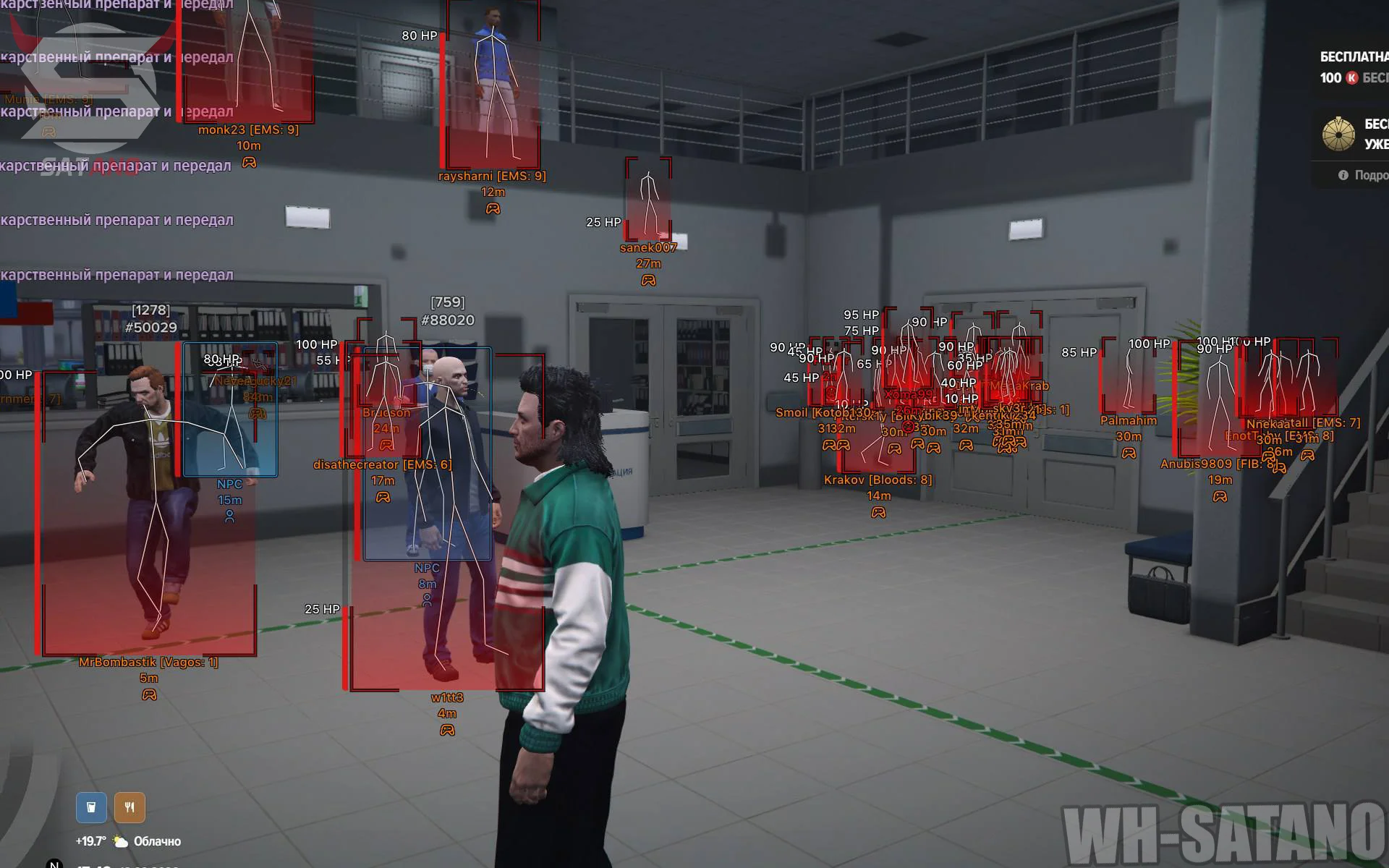
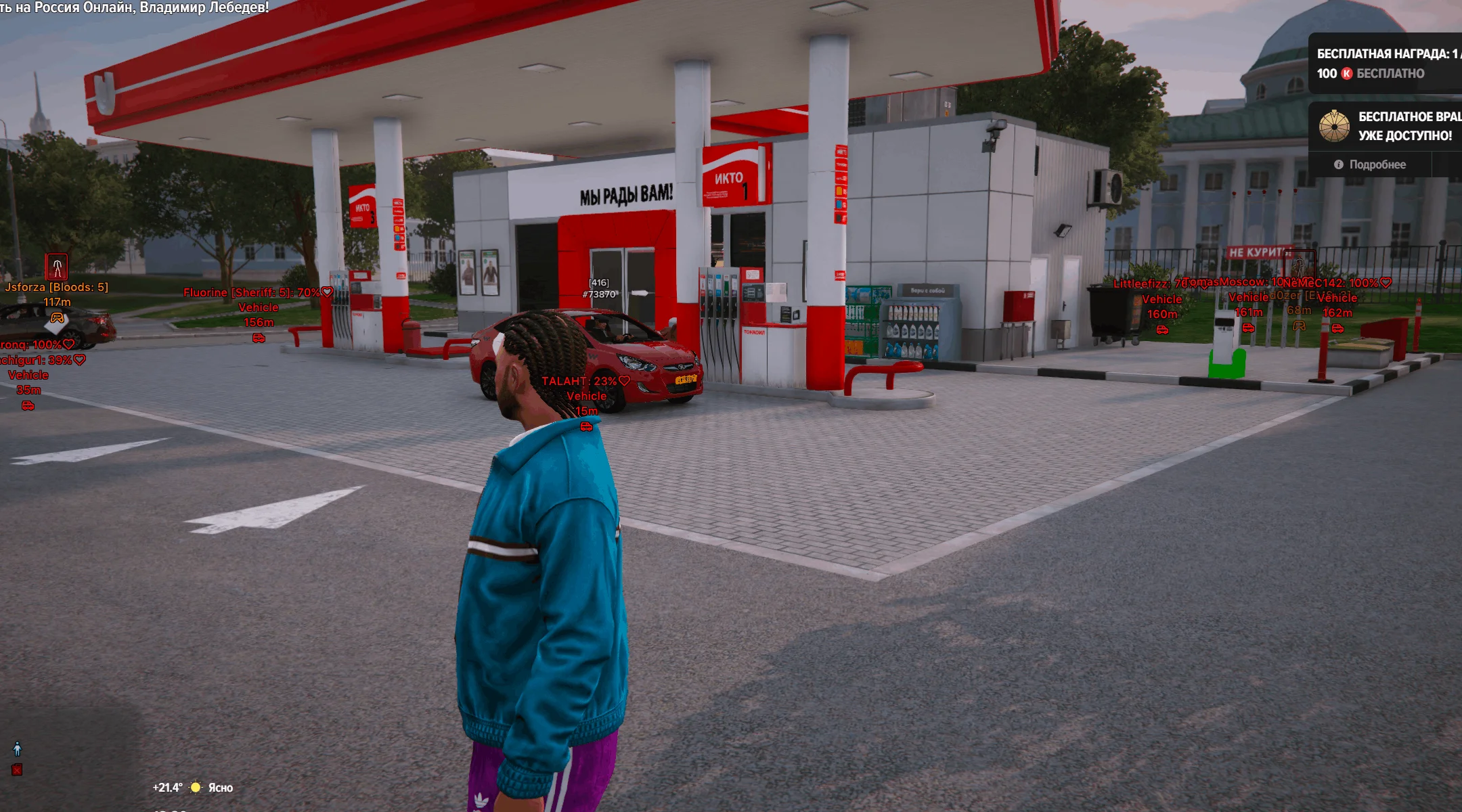
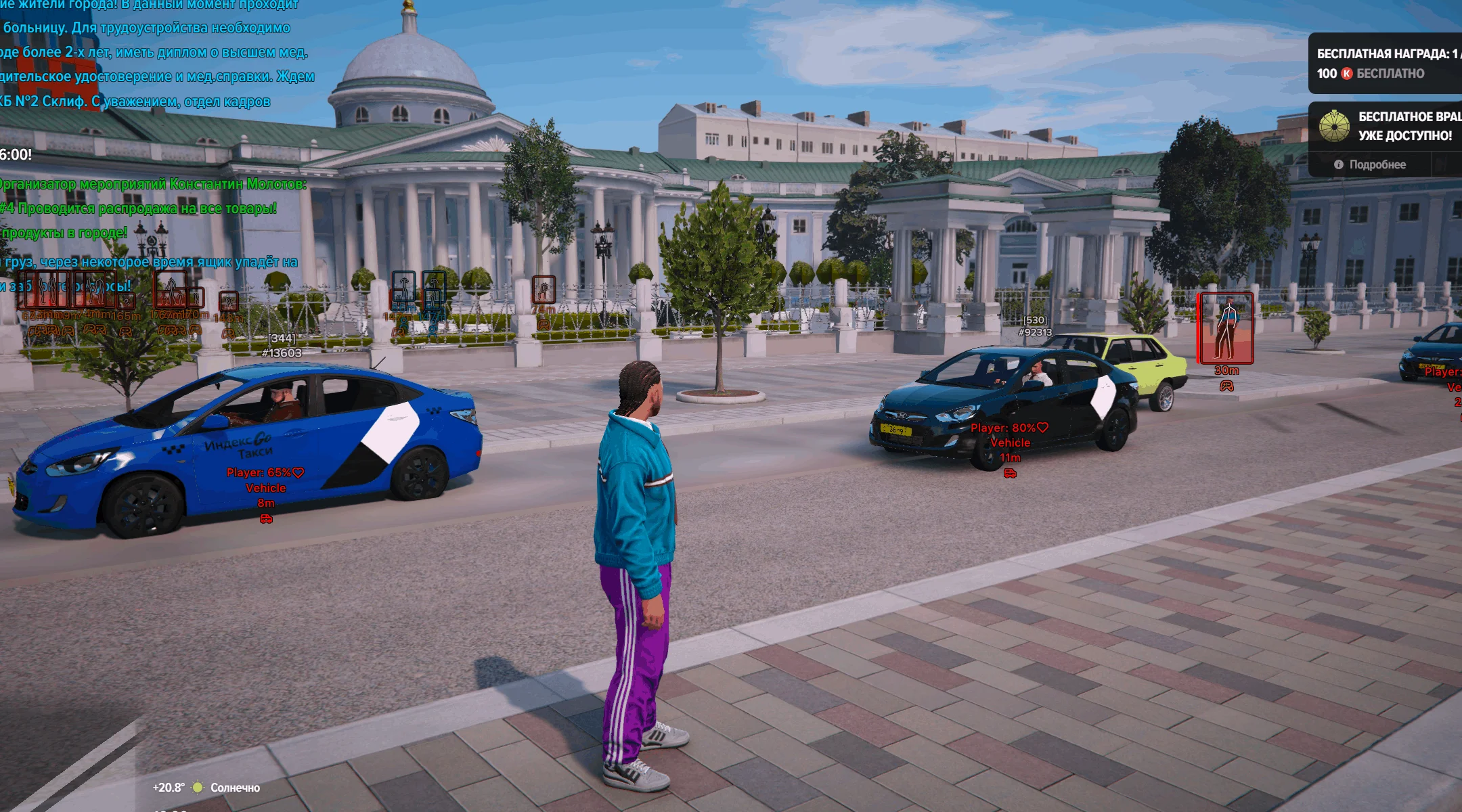
Arcane for GTA 5 RP — a new version of the popular mod menu adapted for the Majestic and RageMP RP projects. The product offers a large set of features for various gameplay scenarios: from a classic Aimbot and stylish ESP to numerous additional features and vehicle tools. The core combat functionality is built around a powerful Aimbot with a wide range of settings for players and bots. The visual side is represented by an informative ESP with display of players, administrators, bots, and vehicles, along with flexible section customization. Special attention is given to extra functions: no weapon recoil, instant health and armor restoration, infinite stamina, increased damage, explosive bullets, Speed Hack, and various Teleport options — to a point on the map or directly to the position on the screen. For vehicles, a large set of options is provided, including a full physics editor and tuning directly in the menu. Arcane also supports a convenient HUD with useful information and a profile system, allowing you to create configurations for different playstyles, quickly switch between them, and share ready-made settings.
System Requirements
- Operating system: Windows 10, Windows 11 (21H2, 22H2, 23H2, 24H2, 25H2)
- Processor: Intel & AMD
- Video card: Nvidia & AMD
- Client: Steam, Majestic, RageMP
Aimbot (Aim Bot)
- Enabled – toggles automatic aiming on/off
- Mode – selects the operating mode (hold or always on)
- Aim Key – aimbot activation key
- Prediction – predicts target movement (leading)
- Player Lock – locks the aimbot onto the selected player
- Target NPCs – allows aiming at NPCs
- Target Friends – allows aiming at friends
- Visible Check – aims only at visible players
- Aim with Melee Weapons – enables aimbot for melee weapons
- Aim with Throwable Weapons – enables aimbot for throwable weapons
- Smooth – adjusts aim smoothness
- Max Distance – sets the aimbot activation distance
- Draw Aim FOV – displays the aimbot area as a circle
- Hide Aim FOV – hides the FOV for disabled weapon types
- FOV Color – adjusts the FOV color
- FOV Thickness – adjusts the FOV thickness
- FOV Radius – changes the FOV radius
- Target Bone Mode – selects hitbox priority for the aimbot (selected bones or the one closest to the crosshair)
- Selected Bone – selects the bone to aim at (head, neck, chest, stomach)
Players ESP (Wallhack)
- Enabled – enables ESP for players
- Visibility Check – determines player visibility
- Admins Color – adjusts the display color for administrators
- Player Info – displays the player's name, faction, distance, and icon
- Info Color – adjusts the player info color
- Health Bar – displays health as a bar with style selection
- Health Text – shows the numeric health value
- Armor Bar – displays armor as a bar with style selection
- Armor Text – shows the numeric armor value
- Bars Render Condition – sets the condition for displaying bars: always or only if the value is not zero
- Bounding Box – displays a full or corner box
- Bounding Box Color – adjusts the box color
- Fill Box – adds a solid or gradient fill
- Fill Box Color – adjusts the fill color
- Skeleton – displays the player skeleton
- Skeleton Color – adjusts the skeleton color
- Max Distance – sets the maximum render distance
NPC ESP (Bots)
- Enabled – enables ESP for NPCs
- Visibility Check – determines NPC visibility
- NPC Info – displays the NPC's name, distance, and icon
- Info Color – adjusts the NPC info color
- Health Bar – displays NPC health as a bar
- Health Text – shows the numeric health value
- Armor Bar – displays armor as a bar
- Armor Text – shows the numeric armor value
- Bars Render Condition – sets the condition for displaying bars
- Bounding Box – displays a full or corner box
- Bounding Box Color – adjusts the box color
- Fill Box – adds a solid or gradient fill
- Fill Box Color – adjusts the fill color
- Skeleton – displays the NPC skeleton
- Skeleton Color – adjusts the skeleton color
- Max Distance – sets the maximum render distance
Vehicle ESP
- Network Vehicles – displays other players' vehicles
- NPC Vehicles – displays NPC vehicles
- Vehicle Info – shows the vehicle name, distance, and icon
- Vehicle Info Color – adjusts the vehicle info color
- Draw Self Vehicle – displays your own vehicle
- Draw Empty Vehicles – displays empty vehicles
- Network Passengers Render Mode – selects how passengers in network vehicles are displayed
- Network Passengers Info Mode – selects compact or detailed passenger info mode
- Network Passengers Info Condition – sets the condition for displaying passenger info
- NPC Passengers Render Mode – selects how NPC passengers are displayed
- NPC Passengers Info Mode – selects compact or detailed info mode for NPC passengers
- NPC Passengers Info Condition – sets the condition for displaying NPC passenger info
- Render Distance – sets the maximum render distance
Exploits (Player)
- Instant Death – instantly kills the character
- Wanted Level – allows changing the wanted level
- Health – instantly restores health
- Armor – instantly restores armor
- Stamina – instantly restores stamina
- Bullets – protects against bullet damage
- Friends – protects against damage from allies
- Collision / Fall – protects against collision and fall damage
- Melee – protects against melee damage
- Teleport – allows moving the player to a specified location
- To Waypoint Key – key for teleporting to the set map marker
- Raycast Teleport Key – key for selecting a point on the screen and teleporting
- No Spread – disables weapon spread
- No Recoil – disables weapon recoil
- Extended Damage – increases weapon damage
- Explosive Ammo – adds explosive ammo
- Speedhack – changes movement speed (speedhack)
- Speedhack Key – speed boost activation key
- Speedhack Multiplier – adjusts the speed multiplier
- Speedhack Mode – selects the mode (hold or always on)
Exploits (Vehicle)
- Infinite Vehicle Health – keeps vehicle durability infinite
- No Collision Damage – disables collision damage
- No Weapon Damage – disables weapon damage
- No Deformation – disables vehicle deformation
- No Engine Damage – disables engine damage
- No Tire Damage – disables tire damage
- Color Mode – selects the vehicle color mode (Custom, Common Random, Separate Random, or Rainbow)
- Configurable Color Mode – selects shared or separate color configuration mode
- Random Color Delay – adjusts the delay for changing random colors
- Common Color – sets the shared color
- Primary Color – adjusts the primary color
- Secondary Color – adjusts the secondary color
- Tire Smoke Color – adjusts the tire smoke color
- Neon Color – adjusts the neon color
- Max Engine – sets the maximum engine upgrade
- Max Brakes – sets the maximum brakes upgrade
- Max Transmission – sets the maximum transmission upgrade
- Max Suspension – sets the maximum suspension upgrade
- Max Armor – sets the maximum armor upgrade
- Max Turbo – sets the maximum turbo upgrade
- Max Headlights – sets the maximum headlights upgrade
- Max Neon – sets the maximum neon upgrade
Vehicle Physics (Handling)
- Handling Data – editing handling parameters
- Read from Vehicle – reads parameters from the vehicle
- Write to Vehicle – applies parameters to the vehicle
- Mass – adjusts vehicle mass
- Gravity – adjusts the effect of gravity
- Downforce Multiplier – changes the downforce multiplier
- Centre of Mass – adjusts the center of mass position on the X, Y, and Z axes
- Drive Inertia – adjusts drivetrain inertia
- Upshift – adjusts upshifting
- Downshift – adjusts downshifting
- Initial Drive Force – adjusts the initial drive force
- Drive Max Flat Velocity – sets the maximum speed
- Initial Drive Max Flat Velocity – sets the initial maximum speed
- Brake Force – adjusts braking force
- Handbrake Force – adjusts handbrake force
- Steering Lock – sets the maximum steering angle
- Traction Curve Max – adjusts the maximum traction curve value
- Traction Curve Lateral – adjusts the lateral traction curve
- Traction Curve Min – adjusts the minimum traction curve value
- Traction Curve Ratio – adjusts the traction curve ratio
- Traction Spring Delta Max – sets the maximum traction spring delta
- Traction Spring Delta Max Ratio – adjusts the maximum traction spring delta ratio
- Low Speed Traction Loss Multiplier – adjusts traction loss at low speed
- Traction Bias Front – adjusts front traction bias
- Traction Bias Rear – adjusts rear traction bias
- Traction Loss Multiplier – adjusts the traction loss multiplier
- Suspension Force – adjusts suspension force
- Suspension Compression Damping – adjusts suspension compression damping
- Suspension Rebound Damping – adjusts suspension rebound damping
- Suspension Upper Limit – sets the upper suspension limit
- Suspension Lower Limit – sets the lower suspension limit
- Suspension Raise – adjusts suspension height
- Suspension Bias Front – adjusts front suspension bias
- Suspension Bias Rear – adjusts rear suspension bias
- Anti-Rollbar Force – adjusts anti-roll bar force
- Anti-Rollbar Bias Front – adjusts front anti-roll bar bias
- Anti-Rollbar Bias Rear – adjusts rear anti-roll bar bias
HUD
- Crosshair – enables a custom crosshair in the center of the screen
- Crosshair Color – adjusts the crosshair color
- Crosshair Style – selects the crosshair style (plus, circle, dot, X, half, galactic compass, triangle)
- Crosshair Size – adjusts the crosshair size
- Crosshair Thickness – adjusts the crosshair thickness
- Reduce ESP Opacity When Hovered – reduces ESP opacity when hovered
- Show Hover Circle – displays the hover circle
- Hover Radius – adjusts the hover circle radius
- Players – displays players in the HUD
- Admins – displays administrators in the HUD
Other Arcane GTA5RP Features
- Battle Mode – hides unnecessary ESP category displays at the press of a button (configurable)
- Menu Key – key for opening the mod menu
- Unload Key – key for safely unloading from the game
- DPI Scale – adjusts the overlay/ESP interface scale
- FPS Limit – sets the overlay FPS limit
- Create – creates a configuration
- Delete – deletes a configuration
- Load – loads a configuration
- Save – saves the current configuration
- Share – allows sharing a configuration
Similar Products
Arcane GTA V Online Enhanced + Legacy
- Full support for GTA Online Enhanced Edition + Legacy
- Aimbot + ESP/WH for Players, Peds, Vehicles and Items
- God Mode, No Recoil/Spread, Teleport, No Wanted level and much more
Midnight GTA V (BE, Online)
- Midnight version for GTA Online with the BattlEye anti-cheat
- Extensive functionality for any task in the game
- ESP/WH, character progression, protection from cheaters, and much more
Unicore FiveM (GTA V)
- Cheapest Cheat for FiveM
- Safe for a long time
- ESP, Aimbot and Exploits with detailed settings
Unicore (RageMP, Majestic, ALT:V)
- Cheapest Cheat for Rage MP
- Majestic RP and Alt:V are also supported
- Aimbot, ESP and many other types of hacks for GTA