Softhub Web Radar Arena Breakout (ABI Radar)

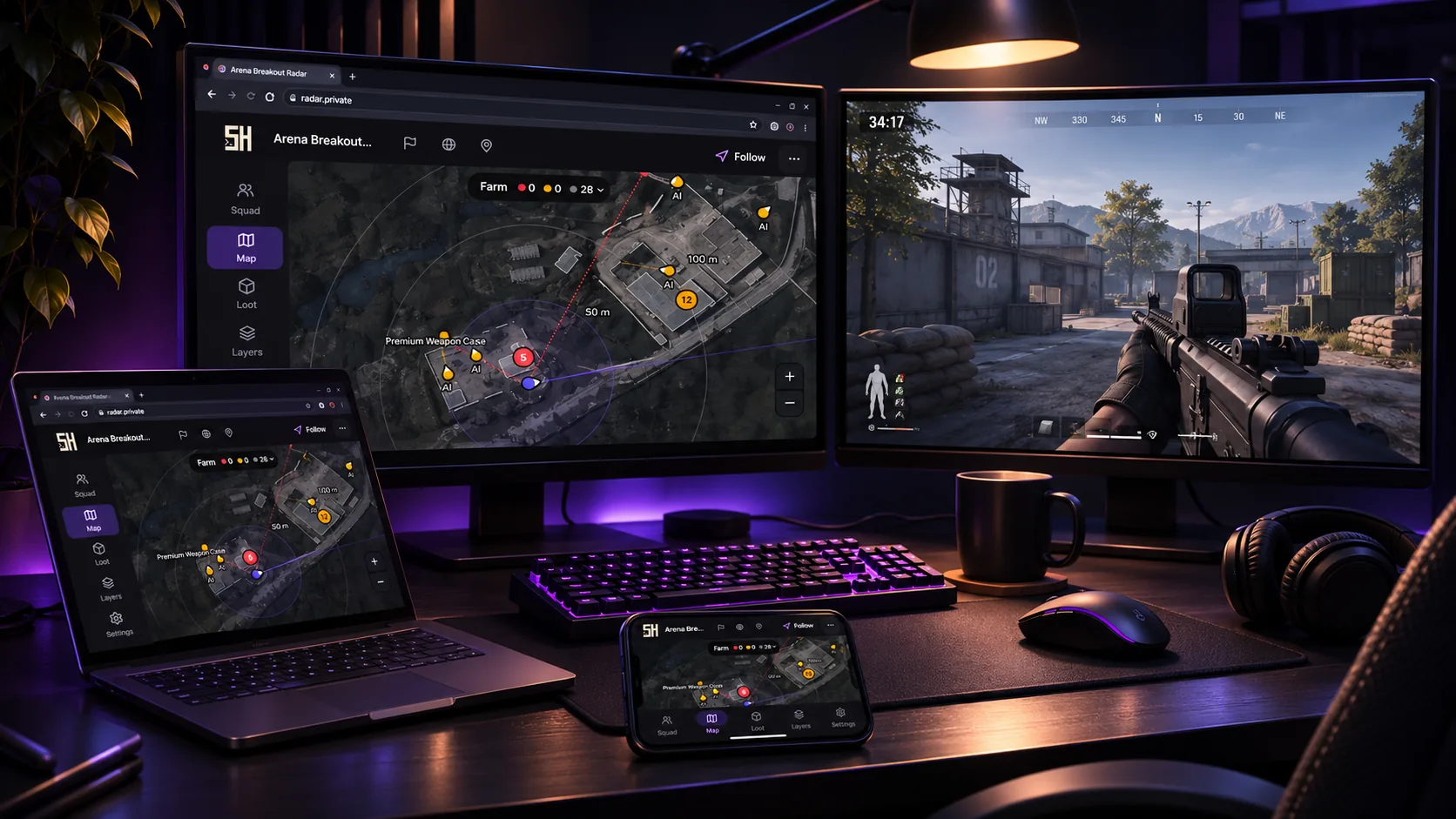
Information about cheat
Softhub Web Radar — a browser-based radar for Arena Breakout from the Softhub team that provides additional information about what is happening during a raid. The solution allows you to track players and bots, view their roles, health level, gear value, weapons in hand, and other available details. Aim Alerts deserve special attention — notifications about enemies who are looking in your direction. For more convenient control, there is a threat list with sorting by distance, gear value, name, and team number. The radar also offers a detailed loot display system with filters by value, type, category, and other parameters, including containers. The interface supports automatic map and floor detection, hiding unnecessary levels, tracking your own position, adjusting zoom and centering. Additionally, about 10 interface themes and fonts are available, along with interface scaling, settings export, and localization in six languages. All of this makes Softhub Web Radar a convenient tool for those who want to navigate raids better and receive more information about their surroundings.
System Requirements
- Operating system: Windows 10 (21H2, 22H2), Windows 11 (21H2, 22H2, 23H2, 24H2, 25H2, 26H1, 26H2)
- Processor: Intel & AMD
- Video card: Nvidia & AMD
- Client: Arena Breakout Launcher, Steam
Players
- Enemy Players – markers for enemy players
- Bots – separate display layer for bots
- Teammates – separate markers for allies
- Name and Distance – player name and distance
- Height Difference – height difference with an up or down arrow
- Weapon in Hand – player's weapon with the full name in the tooltip
- Team Number – enemy squad number
- Health – player's current health with a colored bar
- Gear Value – player's equipment value in Koen
- Sight Line – view direction and customizable line length
- AI Layer – separate bot layer with information in tooltips
Aim Alerts
- Aim Alert Marker – red marker when someone aims at you
- Alert Banner – threat notification with name, distance, and weapon
- Alert Angle – detection angle setting for the alert
- Alert Range – detection distance from 25 to 1000 m
Threat List
- Threat List – list of threats with player characteristics
- Threat Sorting – sorting by threat, distance, value, name, or team
- Squad Tab – separate list of allies with their characteristics
- Player Selection – select a player with one click
- Player Tracking – track a player with radar centering
- Player Tags – aiming and tracking marks
- Color Tag – highlight an enemy with one of six colors
- View as Player – view the radar and threats from the selected player's perspective
- Player Tooltip – details when hovering over or clicking a marker
Loot
- Rarity Colours – six rarity color levels with color customization
- Item Name and Price – displays the item name and value
- Minimum Value – loot value filter from 10K to 500K
- Minimum Rarity – hides items below the selected rarity
- Loot Radius – item display radius up to 600 m
- Loot Categories – filters for attachments, ammunition, equipment, food, medicine, and other loot
- Item Type – item type: magazine, scope, helmet, armor, and others
- Loot Container – displays the container where the item is located
- Loot Height Difference – arrows to determine the item's height position
- Smart Clusters – combines nearby items into groups
- Cluster Preview – preview of the five most expensive items in a group
- Cluster Zoom – zoom the map to the selected group
- Auto Clustering – automatically combines items within a 0–60 m radius
- Item Rules – individual item display rules: show, notify, or hide
- Spawn Notification – notification when a desired item appears with its characteristics
- Loot List – full loot list with search and filters
- Loot Sorting – sorting items by value
- Route to Item – build a route to the selected item
- Ground Weapons – separate layer and list for weapons on the ground
- Container Types – identifies container types: safes, cases, bags, and computers
- Container List – list of containers with search, counters, and filters
- Container Colours – individual colors for container types
- Stacked Counter – combines containers at the same point with a counter
- Bodies – markers for dead players' bodies with names
Interface
- Floor Detection – automatic floor detection based on height
- Manual Floor Selection – manual floor switching
- Floor Opacity – reduces the opacity of other floors
- Follow Player – centers the map on the character
- Map Rotation – rotates the map according to view direction
- Free Camera – freely move the camera around the map
- Zoom – map zoom with saved settings
- Center Map – centers the map on the player
- Fit Map – fits the map to the screen size
- Distance Rings – distance ring settings
- Hearing Radius – show the footstep hearing radius circle
- Map Underlay – map color and opacity settings
- Route to Anything – route to items, weapons, containers, and bodies
- Raid Header – panel with location, players, AI, and compass
- Status Icons – indicators for account status, decrypted data, and coordinates
- Focus Mode – hides all panels except the map
- Desktop Panels – move and resize panels
- Mobile Layout – mobile interface with bottom tabs and slide-out panels
- Markers and Labels – customization of markers, labels, and theme colors
Other Softhub ABI Radar Settings
- Hotkeys – keybinds for quick radar control
- Themes – up to 10 interface themes available to choose from
- Fonts – 11 font options available to choose from
- Interface Scale – adjusts the interface scale
- Compact Density – compact display of elements
- FPS Cap – enables a frame rate limit
- Settings Export – exports the configuration to an encrypted file
- Reset Settings – reset settings for a tab or the entire configuration
- Languages – the radar supports multiple localization languages
- Streamer Mode – removes nicknames and leaves only player roles
- Radar Link – radar link for opening on different devices and sharing with friends
- Encrypted Connection – secure connection with automatic reconnection
Similar Products
Phoenix ABI Chams
- Chams-Wallhack: highlight only players
- Minimal detection risk – only WH, no unnecessary modules.
- Low system load, fast operation, and regular updates.
Mason ABI Spoofer
- Allows bypassing HWID ban in Arena Breakout Infinite
- Stable performance and high compatibility
- No complex setup required
Ghost ABI
- Powerful Aimbot with flexible settings: Legit & Rage
- Wallhack: Players, Bots, Loot. Convenient and stylish!
- Additional exploits (Misc features)
Crooked ABI
- Precise aimbot with prediction and recoil compensation
- Detailed ESP (players, bots, loot)
- Radar, StreamProof, and flexible in‑menu configuration