SoftHUB Radar for Escape from Tarkov (EFT)

Information about cheat
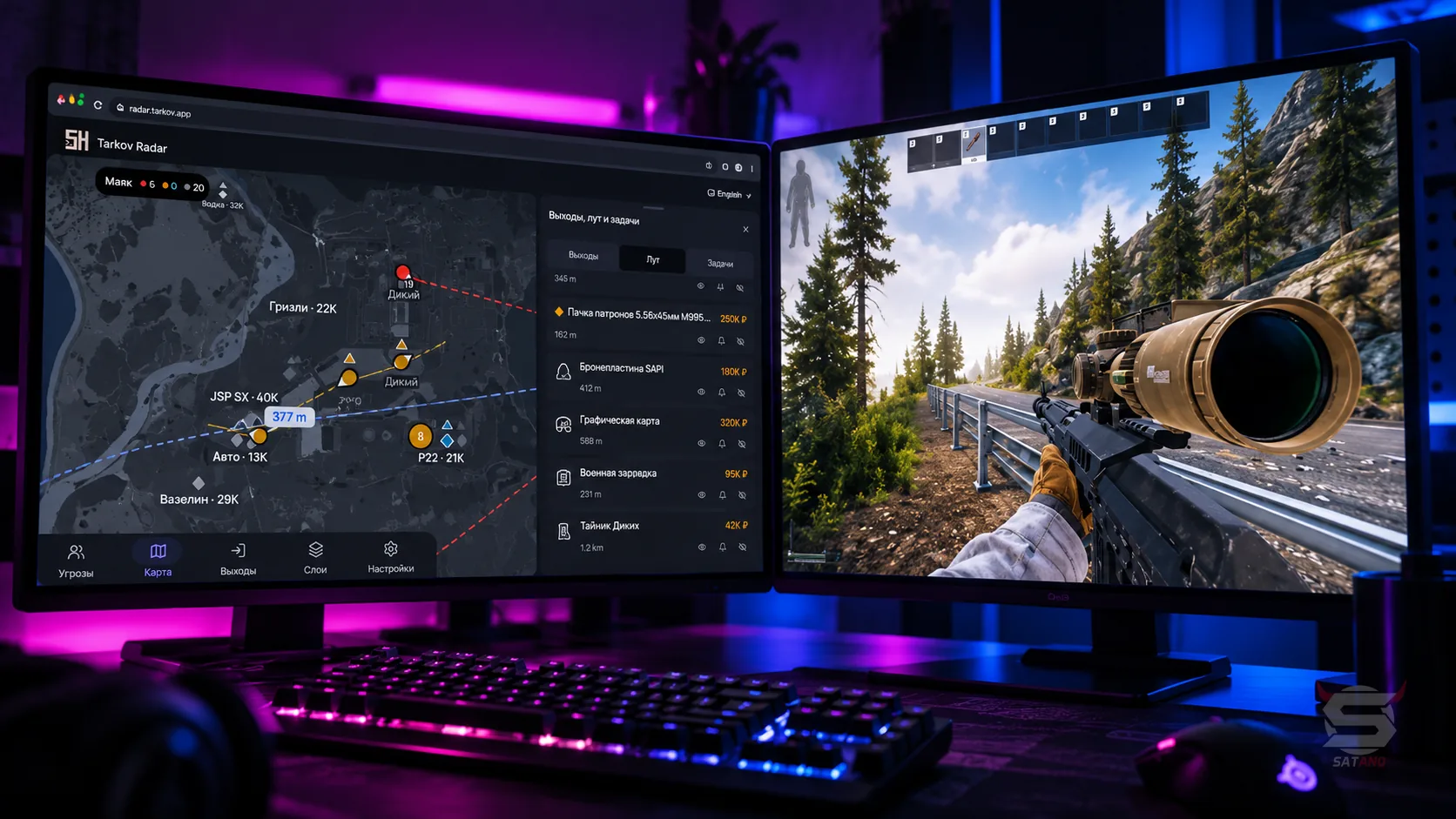
SoftHUB Radar for Escape from Tarkov — a multifunctional browser-based radar that combines tracking of players, bots, loot, quest objectives, and extraction points. It displays USEC and BEAR PMCs, scavs, bosses, raiders, rogues, and cultists with additional information such as nicknames, weapons, distance, height, and view direction. Aim Alerts deserve special attention: notifications when a player or bot is aiming at you, showing distance, weapon, and a customizable detection angle. A threat list, personal markers, and selected target tracking help organize information about everything happening in the raid. The advanced loot module offers filtering by category, value, and distance, notifications for valuable items, loot grouping, and protected display of quest items. The radar also supports all game maps, including The Lab, automatic location and floor detection, extraction status display, and route building to exits, items, quest points, and the BTR. The built-in task planner helps track quest stages and required items. The interface adapts to both PC and mobile devices, offering flexible customization of markers, themes, panels, and hotkeys. Additional features include configuration export, streamer mode, a multilingual interface, and automatic connection recovery.
System Requirements
- Operating system: Windows 10, Windows 11 (21H2, 22H2, 23H2, 24H2, 25H2, 26H1, 26H2)
- Processor: AMD & Intel
- Video card: AMD & NVIDIA
- Client: Battlestate Games Launcher (BSG), Steam
Players
- PMC & Scav Players – displays USEC, BEAR, and player Scavs with different markers and colors
- Player Nickname – shows the player's nickname
- Distance – displays the distance to the player in meters
- Height Difference – shows whether the player is higher or lower by floors
- Weapon – displays the weapon in the player's hands
- View Direction – shows the player's view direction and lets you adjust the line length
- Team Colors – automatically highlights players on the same team with a shared color
- Vehicle Positioning – correctly displays player positions inside vehicles
Bosses & Bots
- Scav AI – displays regular Scav bots separately from live players
- PMC AI – shows USEC and BEAR bots separately from real PMCs
- Cultists – marks Cultists on the map
- Raiders & Rogues – displays Raiders and Rogues with separate markers
- Bosses & Guards – shows boss names and marks their guards separately
- AI View Direction – displays the view direction of bots
- AI Filters – lets you enable and disable individual AI categories
Aim Alerts
- Aim Detection – detects when a player or bot is aiming at you
- Aim Alert Banner – shows a notification with the target's nickname, distance, and weapon
- Aim Angle – adjusts the aim detection angle from 5° to 45°
- Aim Distance – sets the aim detection distance or disables the limit
Event Tracking
- Threat List – shows a list of players and bosses with faction, distance, height, and weapon information
- Threat Sorting – sorts the threat list by danger level, distance, or nickname
- Target Marking – lets you highlight players and assign them individual colored markers
- Player Tracking – pins the selected player to the center of the screen and tracks their movement
- Player Perspective – switches tracking and alerts to the selected player
- Player Info Card – shows additional information about a player on hover or click
Loot
- Loot Value Colors – highlights items with colors based on their value
- Item Name & Price – displays the item name, its price, or both at the same time
- Minimum Price – hides items cheaper than the set threshold
- Loot Distance – adjusts the maximum loot display distance
- Loot Categories – filters items by category, including valuable loot, medicine, keys, and quest items
- Quest Item Protection – keeps quest items visible regardless of other filters
- Loot Height Indicators – shows arrows indicating whether an item is above or below the current level
- Loot Clusters – groups nearby items together and displays their quantity
- Cluster Preview – shows the most valuable items in a group and lets you zoom in on the map
- Item Rules – lets you configure each item with Always Show, Notify, or Hide mode
- Loot Notifications – alerts you about found items by showing the name, distance, and price
- Loot List – displays a loot list with search, filters, and price sorting
Containers and Vehicles
- Containers – highlights containers with a separate color and groups nearby objects
- Dead Bodies – marks dead player bodies on the map
- BTR Tracking – shows the BTR's position, movement direction, and distance
- Vehicle Icons – lets you choose vehicle icons from several options
Extraction Points
- Extract Status – displays the extract state: open, requires a condition, counting down, or closed
- Secret Extracts – highlights secret extracts with separate markers
- PMC / Scav Extracts – lets you display PMC and Scav extracts separately
- Extract List – filters extracts by type and sorts them by distance
- Extract Route – draws a route line to the selected extract and shows the remaining distance
Quests
- Active Quests – displays active quests and updates progress during the raid
- Quest Checklist – shows quest stages, required items, turn-in quantity, FIR status, and required keys
- Raid Planner – groups quests by readiness for completion in the current raid and on other maps
- Quest Markers – marks quest points and zones on the map
- Quest Route – draws a route to the nearest quest objective
Map & Camera
- All Maps Support – supports all game maps, including the Labyrinth
- Automatic Map Detection – automatically detects the current map after the raid starts
- Floor Detection – detects the current floor by height with the option to switch manually
- Floor Opacity – reduces the opacity of other floors for better level distinction
- Camera Modes – lets you follow yourself, rotate the map by view direction, or move it freely
- Zoom – adjusts the map scale from 20% to 350%
- Cursor-Centered Zoom – zooms the map toward the cursor position
- Distance Rings – displays up to six rings with customizable distance, color, and labels
- Hearing Radius – shows the audible footstep radius around the player
- Map Theme – lets you change the map tint and adjust the background opacity
- Custom Route – draws a route to an item, extract, quest point, or BTR
Interface
- Raid Header – shows the location name, number of PMCs, player Scavs, and bots, as well as a compass
- Movable Raid Header – lets you move and scale the top panel
- Focus Mode – hides interface panels, leaving only the map on the screen
- Desktop Layout – lets you place panels on the left, right, top, bottom, or in separate windows
- Mobile Interface – adapts the interface for phones with bottom tabs, slide-out panels, and touch controls
- Hotkeys – supports hotkeys for tracking, map rotation, free camera, zooming, and panel controls
HUD
- Themes & Fonts – provides a choice of 10 themes and 11 fonts
- UI Scaling – adjusts the interface scale from 80% to 130%
- Compact Layout – lets you reduce interface density
- FPS Limit – sets the frame rate limit: 30, 60, 120 FPS, or unlimited
- Marker Shapes – lets you choose the shape of player and object markers
- Marker Fill & Outline – adjusts marker fill and outline
- Direction Indicators – lets you display direction using a wedge, arrow, or line, or disable it
- Marker Icons – lets you assign additional icons to markers
- Color Presets – provides ready-made color palettes, including bright and colorblind-friendly options
- Marker Sets – lets you save, switch, and delete marker style sets
- Player Marker Size – adjusts the size of player markers, as well as the length and thickness of direction arrows
- Labels – adjusts label format, size, color, and outline
- Label Overlap Prevention – automatically hides labels that overlap each other
Other Softhub EFT Radar Features
- Config Export – saves settings to an encrypted file for transfer to another computer or phone
- Settings Reset – lets you reset the settings of an individual tab or the entire radar
- Multilingual Interface – supports Russian, English, Chinese, Turkish, Spanish, and Portuguese
- Streamer Mode – replaces player nicknames with role labels to hide names on stream
- Shareable Radar Link – creates a radar link that can be opened on another device and shared with teammates
- Encrypted Connection – provides radar connection encryption
- Auto Reconnect – automatically restores the connection after a disconnect
Similar Products
Ancient Chams EFT
- Chams for displaying players and loot (Configuration via menu)
- Exploits to make shooting and moving easier
- Built-in HWID spoofer and low chance of getting banned
Ancient EFT Full
- Flexible Aimbot with Smart Bone and Prediction
- Advanced ESP (WH) for Players and Bosses + Chams
- Powerful Loot ESP and Radar for Farming
Crusader Hack EFT
- Balanced Cheat (Hack) for EFT: Basic Feature Set
- Stylish visual elements: colors, icons, menu
- Player ESP, Loot, Aim, Misc - All you need
EFT Collapse
- Excellent Wallhack, loot value estimation
- Powerful and accurate Aimbot for Tarkov
- Affordable price, low chance of ban