Byster Software for Stay Out (Stalker Online)
Information about cheat
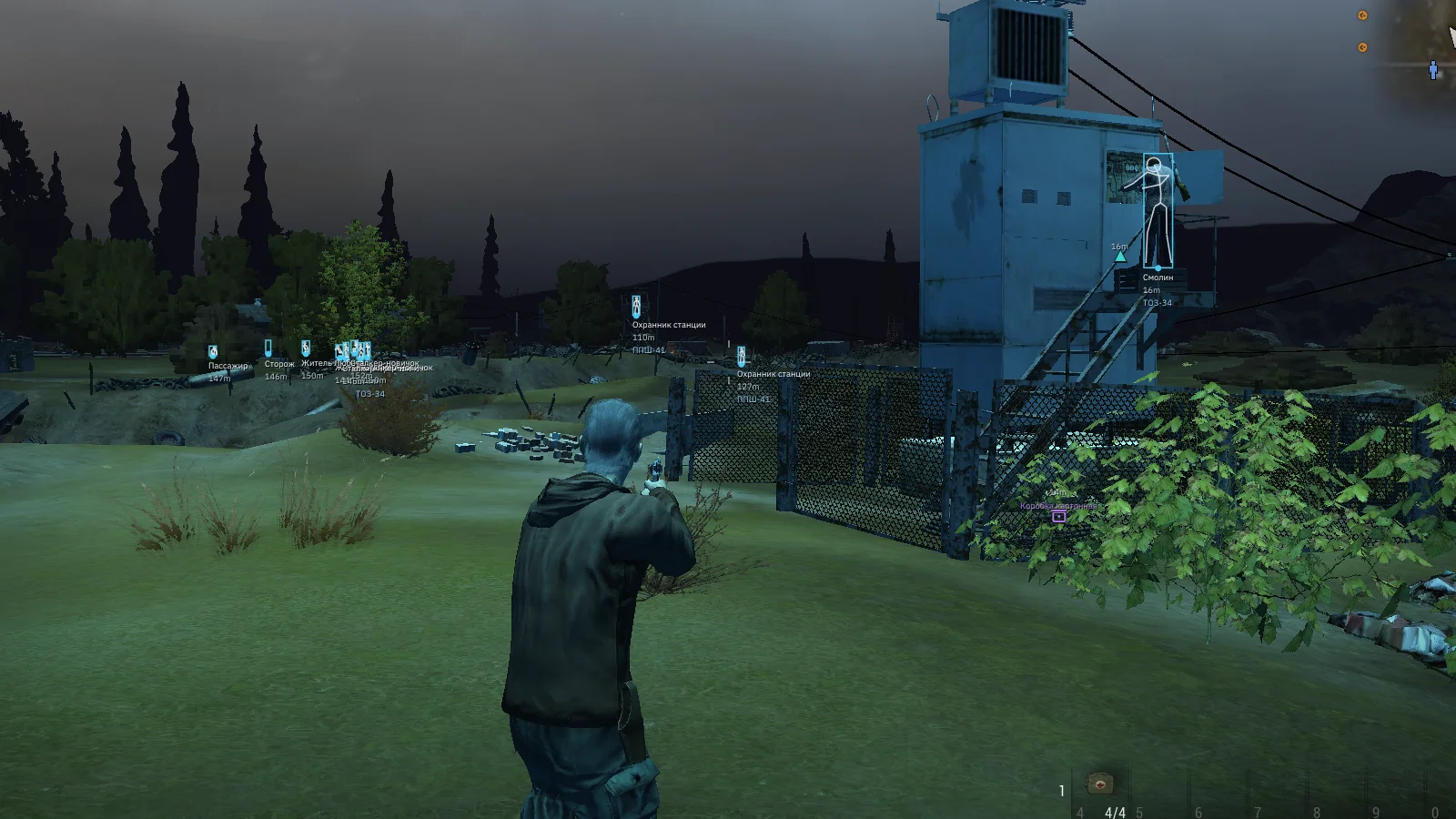
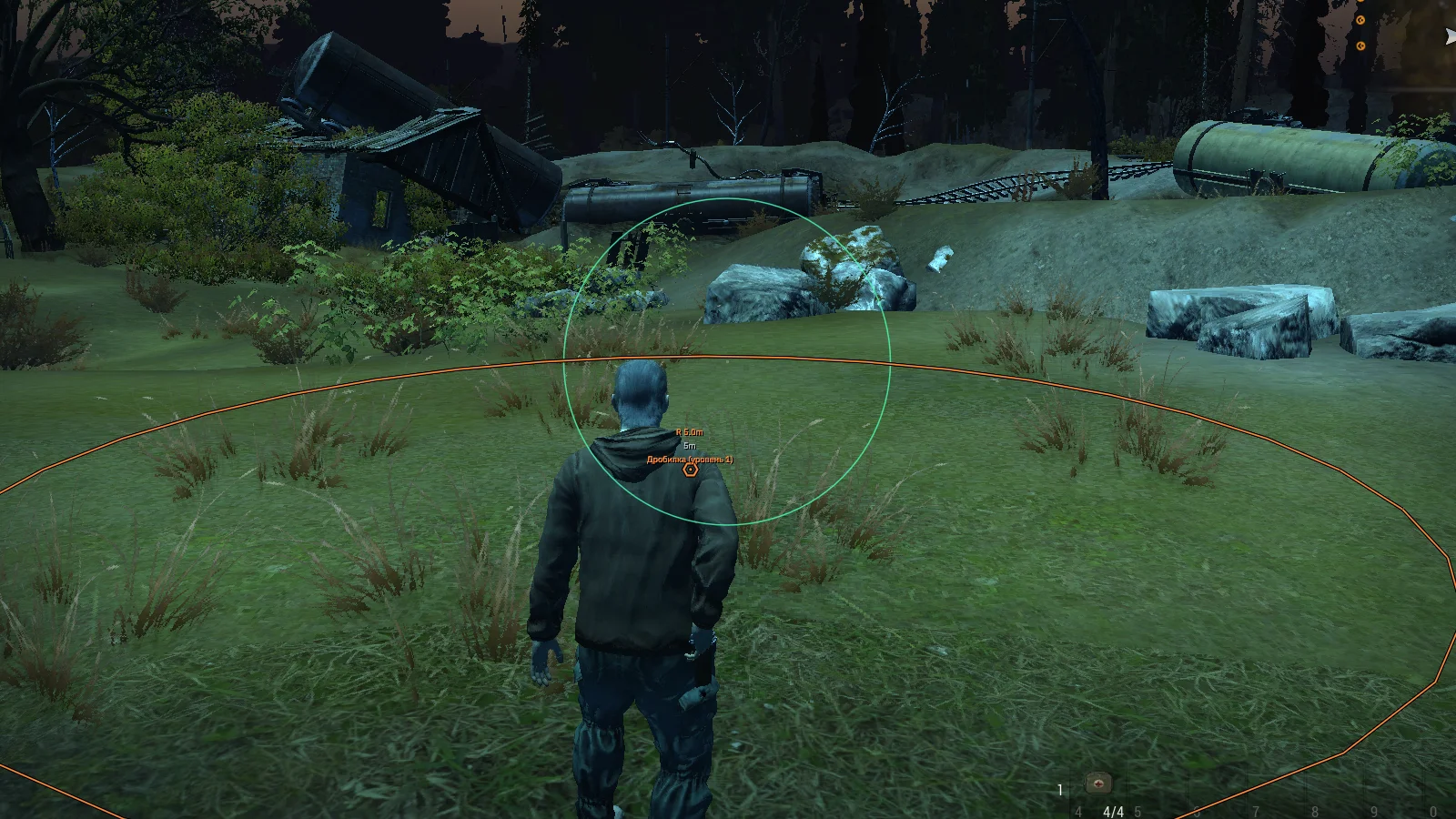
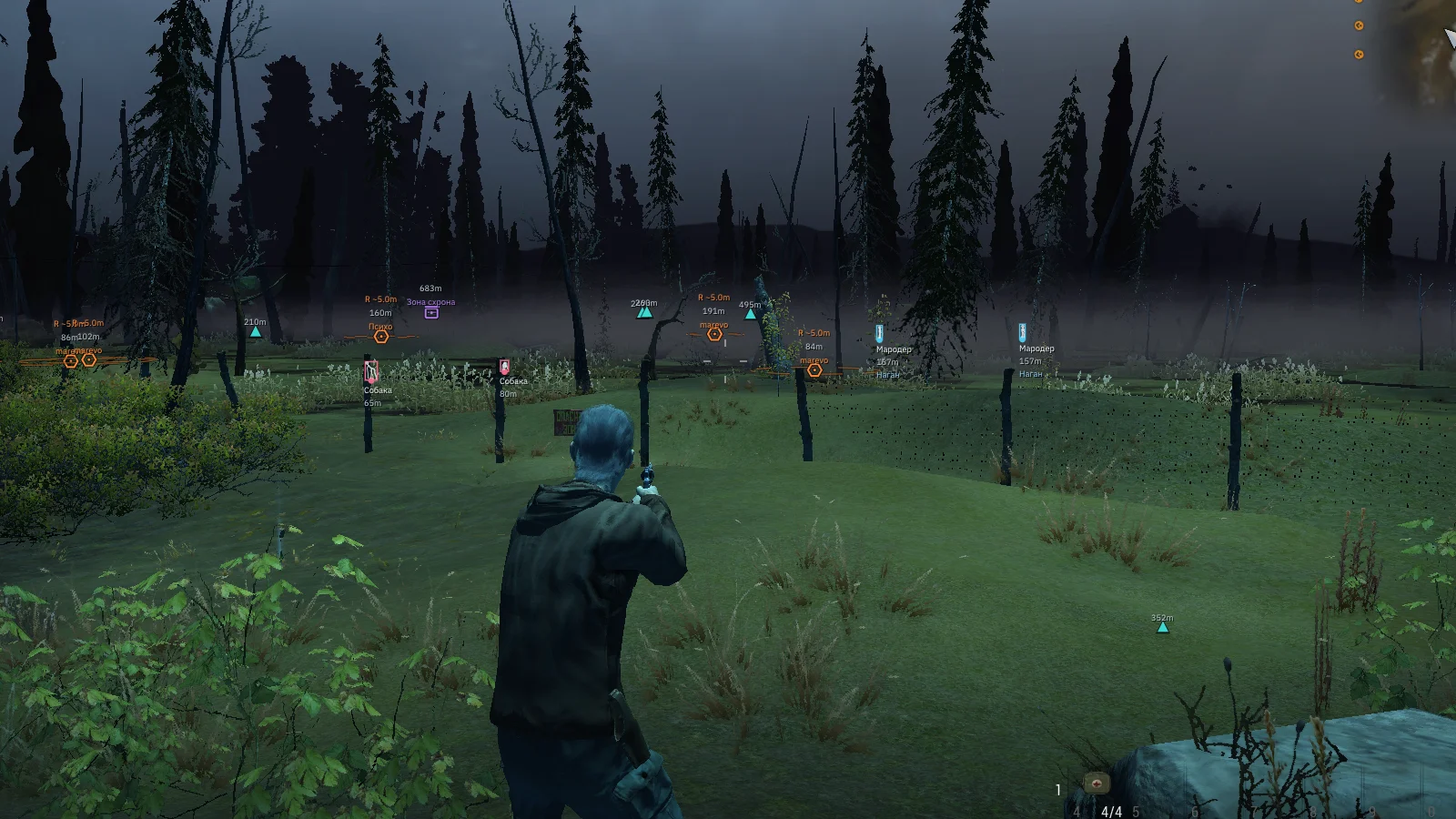
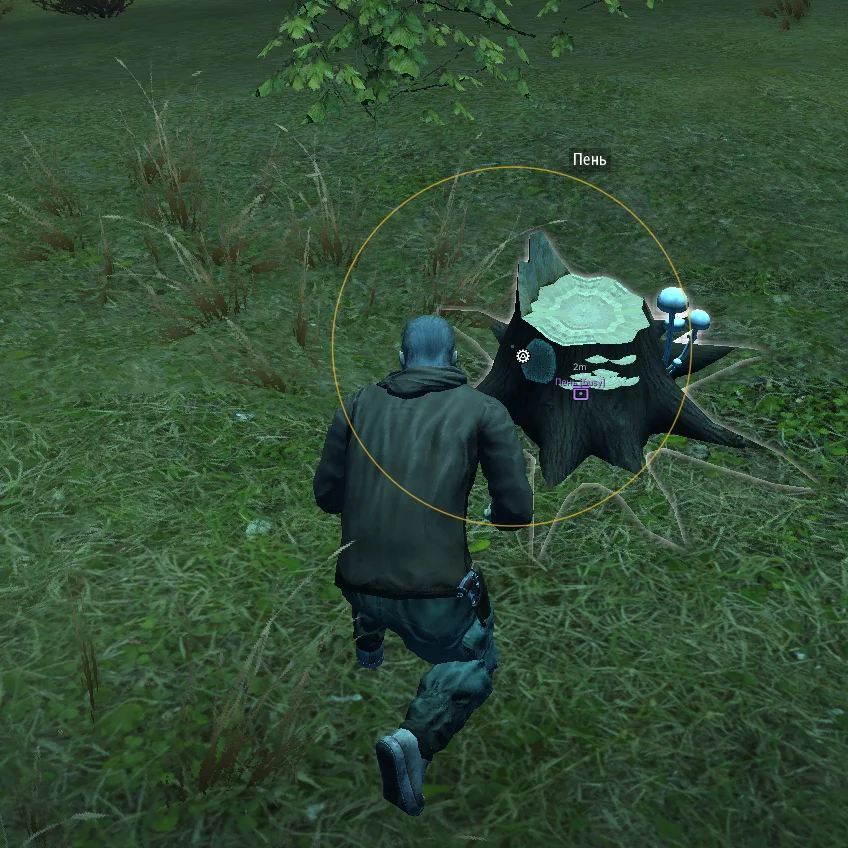
Meet Byster for Stay Out — a powerful private solution for comfortable gameplay and survival in the Zone. At the core of the software is an advanced aimbot with vector and Silent Aim, as well as Magic Bullet, allowing you to hit targets through walls and other obstacles. All key parameters can be flexibly adjusted to suit your own playstyle. Special attention should be given to the large-scale ESP system: players, NPCs, mutants, objects, anomalies, loot, stashes, and other environmental elements can be displayed and configured independently. For resource gathering, an anomaly magnet and automatic artifact pickup are included. The functionality is further complemented by no recoil and no spread, automatic reload, and automatic fire. Byster is an excellent choice for those who need functional software for Stay Out with extensive customization options and additional tools for farming and RMT.
System Requirements
- Operating system: Windows 10 (21H2, 22H2), Windows 11 (21H2, 22H2, 23H2, 24H2, 25H2, 26H1)
- Processor: Intel & AMD
- Video card: Nvidia & AMD
- Client: Steam, Stalker Online
Aimbot
- Enable Aimbot – enables automatic aiming at selected targets
- Silent Aimbot – an additional method of aiming at a target without moving the crosshair (configured separately)
- Aim Key – assigns the aimbot activation key
- Aim Lock – keeps the current target locked until it is lost or leaves the effective range
- Aim Point – allows selecting the aim point (chest, head, legs, nearest point, or automatic selection)
- Aim Response – adjusts the speed and behavior of the aimbot's reaction to target movement
- Aim Deadzone – sets a small zone in which the aimbot does not make additional corrections (deadzone)
- Maximum Aim Step – sets the maximum step for aim direction changes
- Minimum Aim Step – sets the minimum aim correction step
- Far-Distance Response Boost – increases the aimbot reaction speed when aiming at distant targets
- Aim Step Interval – adjusts the interval between consecutive aim corrections
- Lost Target Grace Time – sets the time during which the aimbot continues to hold a lost target
- Invert Horizontal Input – inverts the horizontal control direction while aiming
- Invert Vertical Input – inverts the vertical control direction while aiming
- Target Players – allows selecting players as targets
- Target NPCs – allows selecting NPCs as targets
- Target Creatures – allows selecting creatures as targets
- Prediction – calculates lead when aiming at a target (configurable)
- Ignore Teammates – ignore aim on your squad and clan
Magic Bullets
- Enable Magic Bullet – enables magic bullets to direct the projectile toward the selected target
- Magic Bullet Keybind – assigns the magic bullet activation key
- Visible Targets Only – magic bullets work only on targets within line of sight
- Target Players – select players as targets
- Target NPCs – select NPCs as targets
- Target Creatures – select creatures as targets
- Projectile Speed Multiplier – flight speed multiplier
Player ESP
- Enable Players – enables player display through ESP
- Player Dot – displays a dot on the player's head
- Box – shows boxes around the player
- Skeleton – displays the player's ESP skeleton
- Snapline – shows a line from the screen to players
- Distance – shows the distance to the player
- Name – displays the player's name
- Weapon – shows the weapon in the player's hands
- Individual Layer Colors – allows setting separate colors for different ESP elements
- Max Distance – player ESP range
- Clan – display clan affiliation
- Karma – display karma
NPC ESP
- Enable NPCs – enables NPC display through ESP
- Box – shows a box around the NPC
- Skeleton – displays the NPC skeleton
- Snapline – draws a line from the screen to the NPC
- Distance – shows the distance to the NPC
- Name – displays the NPC name
- Weapon – shows the NPC's weapon
- Individual Layer Colors – allows setting separate colors for NPC ESP elements
Mutant ESP
- Enable – enables mutant and creature display through ESP
- Skeletons – displays the animated skeleton of living mutants and creatures
- Box – shows boxes around creatures
- Snapline – draws a line from the screen to the target
- Distance – shows the distance to the mutant or creature
- Name – displays the target name
- Weapon – shows the weapon being used
- Mutant Color – allows customizing the display color of mutants
- Dead Entity – dead mutants and creatures
World ESP
- Corpses – displays the bodies of dead players
- Wells – shows the locations of wells
- Anomalies – displays anomalies on the map
- Radiation Zones – shows radiation zones
- Items – displays items in the game world
- Artifacts – shows the locations of artifacts
- Containers – displays containers
- Projectiles – shows flying projectiles and other objects
- Quest Objects – displays objects related to quests
- Other Objects – shows other important world objects
- Anomaly Danger Radius Fill – displays the dangerous radius area around anomalies
- Artifact Sound Alert – notifies about the presence of an artifact with a sound signal
- Item Category – shows the item category
- Item Stack Size – displays the number of items in a stack
- Item Value – shows the item value
- Minimum Item Value Filter – allows hiding items whose value is below the specified amount
- Active Quest – display active quests
Stash ESP
- Enable Stash ESP – enables stash display through ESP
- Stash Name – shows the stash name
- Distance – displays the distance to the stash
- Status – shows the current stash status
- Item Count – displays the number of items inside the stash
- Guard Zones – shows guarded zones around stashes
- Guard Radius – displays the guarded zone radius
- Looted Status – shows whether the stash has already been looted
- Maximum Stash Distance – sets the maximum display distance for stashes
- Marker Scale – allows changing the size of stash markers
- Marker Color – allows customizing the color of stash markers
Anomaly Magnet
- Enable Anomaly Magnet – enables automatic anomaly attraction
- Anomaly Magnet Key – assigns the Anomaly Magnet activation key
- Auto Probe Artifacts – automatically uses bolts
- Attraction Distance – sets the anomaly attraction distance
- Maximum Simultaneous Anomalies – maximum number of anomalies processed simultaneously
- Field of View Radius – size of the anomaly search area around the player
- Enable Automatic Artifact Pickup – enables automatic artifact pickup
- Artifact Pickup Key – assigns the automatic pickup activation key
- Artifact Extraction Range – sets the distance at which artifacts can be picked up automatically
Other Byster Stay Out Features
- No Spread – disables weapon spread for more accurate shooting
- No Aim Sway – removes weapon sway while aiming
- No Recoil – disables weapon recoil
- No Reload – removes the need to reload weapons
- Soft Landing – softens character landing
- Force Daytime – forcibly sets the time of day to daytime
- Use Items While Moving – allows using items while moving
- Camera Field of View – allows adjusting the camera field of view
- Automatic Fire – automatic firing mode for any weapon
- Automatic Reload – automatically reloads weapons without animation
- Localization – the software menu supports multiple languages (Russian, English, Chinese)
- Configs – a full settings system for different playstyles (create, save, load, delete, edit)
- Menu Key – the menu hotkey can be changed
- Trusted Mode – hides unsafe features from the menu
Similar Products
Stay Out Hack (Softhub)
- Powerful Aimbot: Vector and Silent
- ESP (WH): Players, Mobs, Loot, Anomalies, Quests
- Everything for RMT: Anomaly Wall, Anomaly Magnet, etc.