PussyCat Software for Once Human (External)
Information about cheat
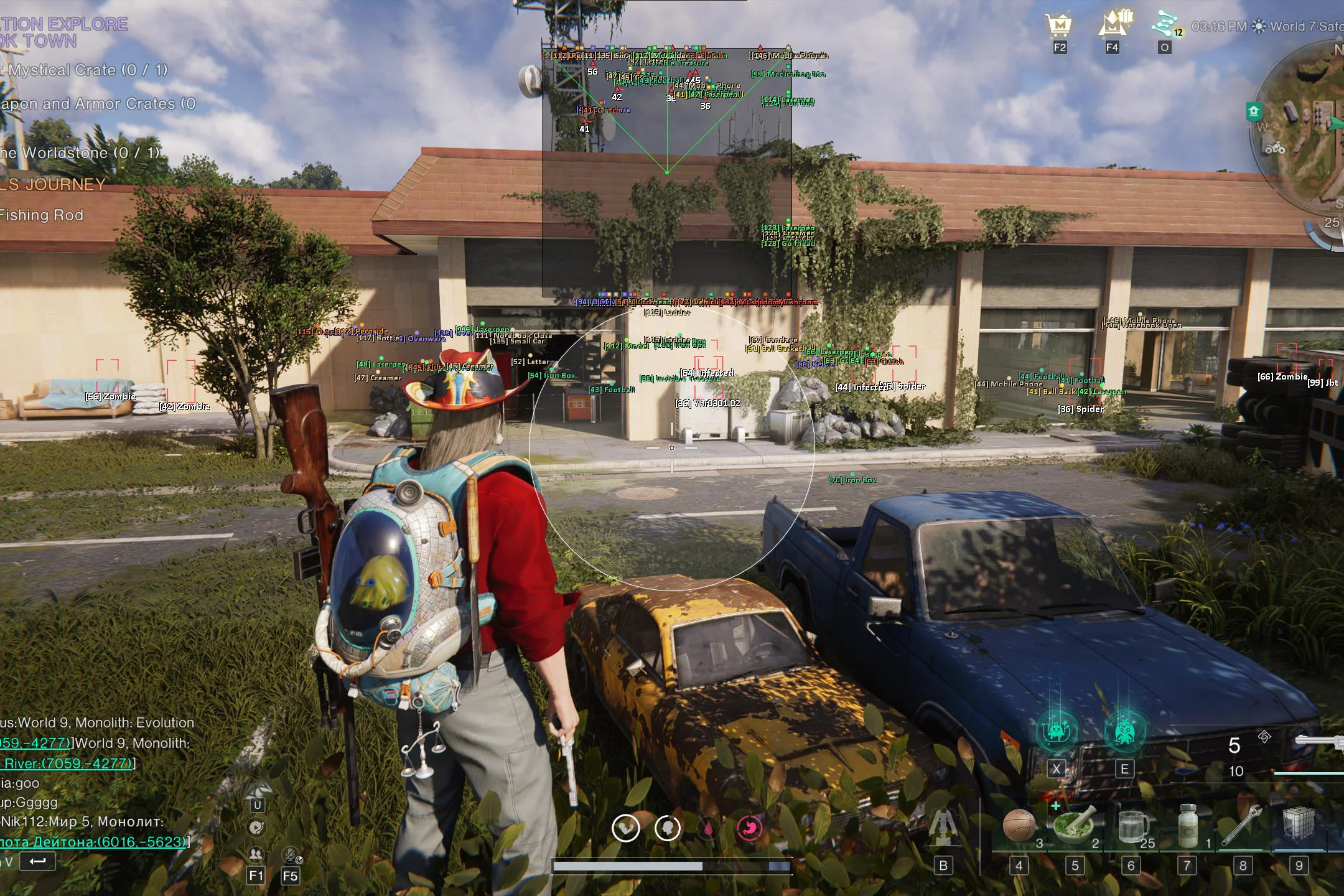
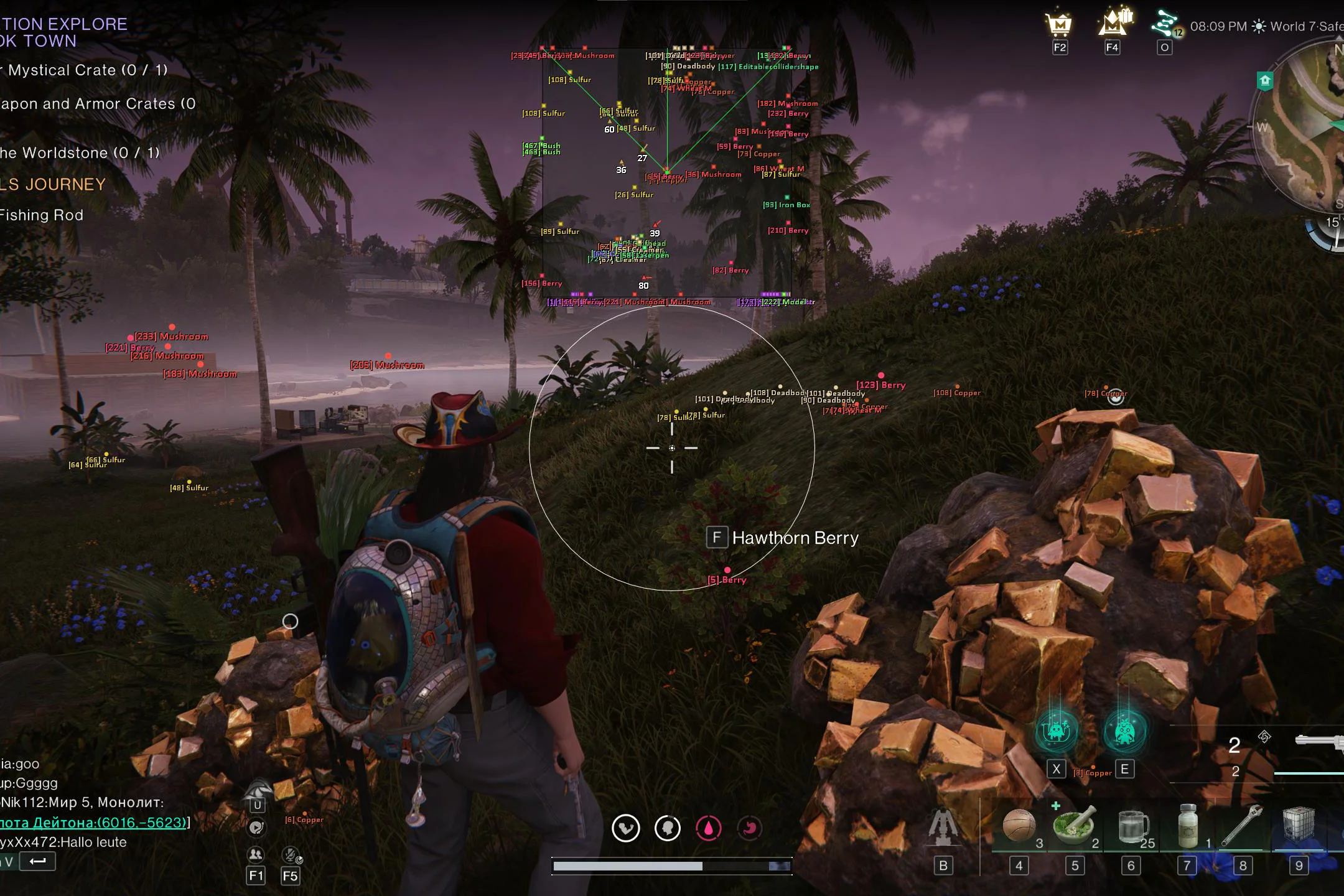
Pussycat for Once Human — a functional External solution with a wide range of settings for comfortable gameplay and convenient world navigation. At its core is a flexible Aimbot with hitbox selection, separate aiming for players and entities, smoothness, FOV, and maximum distance limitation. The aimbot's working area can be visualized using an FOV Circle and fill. The main visual functionality consists of three ESP categories at once. Players ESP displays players with boxes, skeletons, names, weapons, animation, distance, and snaplines. Entities ESP allows you to track animals, mutants, bosses, bots, and deviants. A separate World ESP covers nearly all important world objects: chests, containers, rift anchors, teleports, resources, loot, vehicles, buildings, fishing, and other elements. The functionality is complemented by Radar Hack with adjustable position, size, and display range. For personalization, a custom crosshair, font size adjustment, and a Save/Load Config system are available, allowing you to quickly save and load ready-made configurations.
System Requirements
- Operating system: Windows 10, Windows 11 (21H2, 22H2, 23H2, 24H2, 25H2)
- Processor: Intel & AMD
- Video card: Nvidia & AMD
- Client: Steam, Epic Games, Loading Bay
Aimbot (Aim Bot)
- Enable – enables/disables the aimbot
- Aim Key – a key to activate the aimbot
- Hitbox – allows you to select the body part to aim at
- Aim Players – enables aiming at players
- Aim Entities – enables aiming at entities
- Smooth – enables smooth aiming at the target
- Smooth Amount – adjusts the level of aim smoothing
- Max Distance – sets the maximum aimbot range
- Draw FOV – displays the aimbot area as a circle
- Filled FOV – adds fill to the FOV area
- Aimbot FOV – adjusts the size of the target search area
Entities ESP (Entities)
- Show Entities – enables entity display
- Draw BOX – displays a box around entities
- Snaplines – displays lines to entities
- Names – shows entity names
- Animation – displays entity animations
- Held Weapon – shows the weapon held by the entity
- Radar – displays entities on the radar
- Box Style – allows you to choose the box style for entities
- Snaplines Style – allows you to choose the line style to entities
- Animals – displays animals
- Aberrants – displays Aberrants
- Bosses – displays bosses
- Bots – displays bots
- Deviants – displays Deviants
- Distance – shows the distance to entities
Players ESP (Players)
- Show Players – enables player display
- Draw BOX – displays a box around players
- Snaplines – displays lines to players
- Skelet – displays player skeletons
- Names – shows player names
- Animation – displays player animations
- Held Weapon – shows the weapon held by the player
- Radar – displays players on the radar
- Box Style – allows you to choose the player box style
- Snaplines Style – allows you to choose the line style to players
- Display Your Player – displays your character through ESP
- Ignore Dead – hides dead players
- Distance – shows the distance to players
World ESP (Environment)
- Show World – enables world object display (toggle on/off with a key)
- Distance – shows the distance to objects
- Names – displays object names
- Size – adjusts the size of displayed objects
- Radar – displays world objects on the radar
- Chests – displays chests
- Interactions – displays interactive objects
- Containers – displays containers
- Rift Anchors – displays Rift Anchors
- Teleports – displays teleport points
- Puzzles – displays puzzles
- Harvest – displays harvestable resources
- Berries – displays berries
- Stones – displays stones
- Mushrooms – displays mushrooms
- Ores – displays ores
- Lore – displays collectible lore objects
- Fishing – displays fishing-related objects
- Facility – displays buildings on bases
- Stardust – displays stardust
- Particles – displays particles
- Loot – displays loot
- Vehicles – displays vehicles
Radar Hack
- Radar – enables the radar
- POS X – adjusts the radar position horizontally
- POS Y – adjusts the radar position vertically
- Size – adjusts the radar size
- Radar Range – sets the display range of objects on the radar
Other Pussycat Once Human Features
- Entity Font Size – adjusts the font size for entities
- Player Font Size – adjusts the font size for players
- World Font Size – adjusts the font size for world objects
- Crosshair – enables a custom crosshair
- Thickness – adjusts the crosshair thickness
- Size – adjusts the crosshair size
- Lock Overlay FPS – locks the overlay refresh rate
- Save Config – saves the current settings
- Load Config – loads saved settings
- Menu Key – allows you to change the menu open key
- Unload Software – unloads the software from the game
Similar Products
Once Human Crusader Hack
- ESP: Players, Monsters, Animals and other objects
- Basic Aimbot to make shooting easier
- Teleportation: to bosses, cities and other locations