For players who have long been immersed in the survival and war-sim genres, DayZ has long ceased to be just a "survival simulator." As in Escape from Tarkov, a huge role is played not only by shooting but also by information control, map understanding, navigation, looting, and the ability to read the situation around you in advance. For this reason, software for such games has long gone beyond the usual "wallhack + aimbot" and has gradually turned into full-fledged gameplay tools with deep customization for different playstyles. Over the past years, many projects for extraction shooters, military simulators, and post-apocalyptic survival games have passed through my hands. And DayZ has always stood out among them due to its specifics — huge distances, slow pace, high value of information, and a very large influence of small details on the overall gaming experience. We will look at DayZ Authority in this review from the perspective of such a player.

In this review, we’ll break down in detail:
- how the main functionality of DayZ Authority works;
- how suitable the software is for official and community servers;
- which features are truly useful in real gameplay;
- which mechanics appear most risky from a detection standpoint;
- and how relevant the software is in 2026 given Windows 11 limitations and modern BattlEye anti-cheat systems.
What is the Authority cheat for DayZ?
DayZ Authority is a large, multifunctional cheat with a strong emphasis on configuration flexibility and a wide set of gameplay tools. The software is equally well-suited for careful legit use with minimally noticeable ESP and smooth aimbot, as well as for a more aggressive playstyle using silent aimbot, exploits, and debug utilities. Over its lifetime, the project has gone through several stages of development and a name change. Older players of the DayZ scene may know the software under the name Murkware — that’s where the current version of the cheat started. Later, development moved to the SMG ecosystem, after which the software received a new name — Authority. At the same time, within some communities and platforms, the project continued to be distributed under the name Superior for a long time, which is why even now you can sometimes encounter several names for the same cheat. Despite the rebranding and repositioning, the basic philosophy of the project has remained almost unchanged — Authority still focuses on broad functionality, flexible customization, and adaptation to different playstyles, ranging from relatively careful legit gameplay to extremely aggressive PvP configurations.
The strongest sides of Authority remain:
- advanced ESP system with flexible interface customization;
- two aimbot modes for different gameplay scenarios;
- convenient work with loot filters and navigation;
- built-in HWID spoofer;
- simple config system and independence from third-party overlay programs.
However, the software cannot be called a universal solution for any conditions. Some exploits significantly increase the risk of detection on community servers, and the main technical drawback remains limited compatibility with current versions of Windows 11 — versions 24H2 and newer are currently not supported.
In its current state, DayZ Authority gives the impression of a mature and well-developed project with a strong functional base, especially for players focused on official servers, PvP, and flexible adaptation of the gameplay to their own playstyle.
Architecture and philosophy of DayZ Authority
Most cheats for DayZ can be conditionally divided into two categories. The first — minimalist solutions with a small number of features and almost no customization. The second — large multifunctional projects that try to cover all aspects of the game at once: PvP, navigation, looting, raiding, and interaction with the environment. DayZ Authority clearly belongs to the second category.
However, the key feature of the software lies not only in the volume of functionality. The main idea of Authority is to provide the user with a maximally flexible configuration system, in which almost every element can be adapted to their own playstyle, risk level, and server type. Instead of a rigidly defined set of "turn on and play," a more modular approach is used here: the user decides how aggressive or, conversely, careful the use of the cheat will look in real gameplay.
This philosophy is especially noticeable in the implementation of ESP and aimbot. Almost all interface elements can be finely tuned: change transparency, position, displayed information, hotkeys, and visual style. Thanks to this, Authority is suitable not only for "rage" play with maximally aggressive configs but also for a more cautious legit approach, where the cheat's functionality is made as inconspicuous as possible to both other players and server administrators.
The organization of the interface itself deserves special attention. The cheat's menu is built quite logically and is not visually overloaded: the main functions are divided into categories, and many settings are accompanied by a preview system. This is especially useful in the ESP section — the user can see in advance how the interface elements will look in the game without having to go directly into a firefight or PvP scenario.
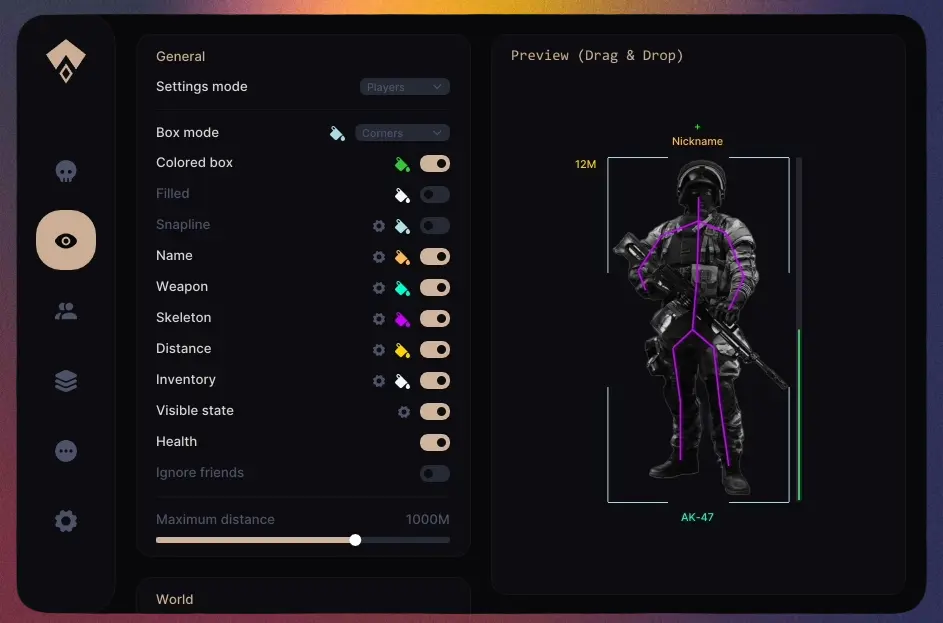
Additionally, the menu features a drag-and-drop system for ESP elements. Health indicators, distances, weapons, and nicknames can be freely moved relative to the player's main model, creating a more convenient and readable interface tailored to personal preferences. In practice, this turns out to be much more useful than it might initially seem: when there is a lot of information on the screen, proper placement of elements directly affects the readability of ESP during active PvP. An important part of Authority's architecture is also the config system. Instead of manually adjusting dozens of parameters each launch, the user can save ready-made profiles for different game scenarios — for example:
- a separate legit config for community servers;
- a more aggressive PvP config for official servers;
- a configuration for looting or base raiding;
- a minimalist set of ESP for solo play.
This approach makes using the software much more convenient in the long run. This is especially noticeable compared to many DayZ cheats where setting up after each launch becomes a separate routine process.
At the same time, DayZ Authority tries to avoid unnecessary dependence on external software. It does not require Discord overlays, third-party injectors, or additional graphics software from NVIDIA or AMD to launch — just the cheat client (loader) itself and a correctly configured game. In practice, this not only simplifies launch but also reduces the number of potential compatibility issues often found in more "capricious" solutions.
How the Aimbot in DayZ Authority works
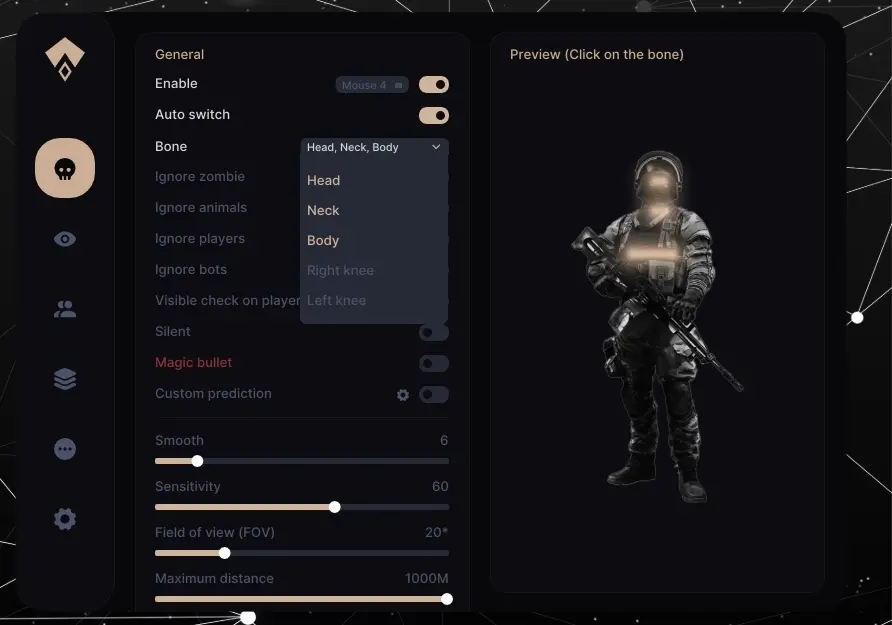
The aimbot system in DayZ Authority is one of the key parts of the entire software and at the same time one of the most flexible in terms of configuration. Unlike many cheats for DayZ where the aimbot works extremely primitively and gives almost no room for adjustment, Authority implements several operation modes for different playstyles and different levels of "detectability." At the same time, one important feature specific to DayZ should be noted. In the DayZ cheat market, it is most often Silent Aim that is encountered, while a full-fledged vector aim is not implemented in every major project. This is primarily due to the specifics of BattlEye and the difficulty of implementing a "human-like" vector aim that would look natural and not create unnecessary detection problems with the "all-seeing eye." For many developers, Silent Aim is significantly easier to implement: such systems are easier to reverse and integrate into the game via hooks, whereas high-quality Vector Aim requires much deeper and more careful work. Especially when it comes not just to sharp snapping onto a target, but to truly smooth and finely adjustable aim that can be used for a long time without blatantly obvious behavior. Judging by the implementation in DayZ Authority, the developers managed to solve this problem quite successfully. It features not only a full-fledged Vector Aim but also a large number of its adjustment parameters, which is relatively rare for DayZ software.
Vector Aimbot (Vector)
Vector Aim is a classic aimbot mode that works by moving the crosshair towards the target. When the assigned key is held, the aim begins to smoothly move towards the enemy, simulating normal mouse movement. This mode is best suited for more "legit" play. With proper smoothness and FOV adjustment, the aim looks fairly neat and doesn't stand out as much as more aggressive modes. This is especially important on community servers with active admins/moderators and manual player checks via Discord.
One of the strong points of Vector Aim is the large number of settings. Here you can separately adjust:
- aiming speed;
- aim smoothness;
- target acquisition radius;
- priority for specific body parts;
- operation through FOV;
- ignoring certain target types.
The last feature is particularly useful in DayZ, where zombies or animals are almost always near players (e.g., on PvE servers). Thanks to filtering, the aimbot will not constantly "jump" between multiple targets during a firefight. For long distances, prediction is additionally provided. If the feature is enabled, the aimbot will slightly shift the aim considering the target's movement and weapon ballistics. This is especially noticeable in open spaces when shooting at several hundred meters.
At the same time, the developers themselves position this mode not just as "Vector Aim," but specifically as a Mouse Emulator Aimbot — an aimbot that emulates full mouse movement. And this is a rather important point that noticeably distinguishes Authority's implementation from many other DayZ cheats. In its behavior, this approach resembles the principle of operation of external solutions like KMBox, Makcu, and other hardware input emulators used for maximally "human-like" aiming and reducing the suspiciousness of aimbot behavior. The difference is that in the case of Authority, this logic is implemented in software, without the need for separate boards or external devices. Judging by the aimbot's behavior itself, the developers clearly paid great attention to making the aiming look as natural as possible. With proper configuration, Vector Aim does not jerk the crosshair with sharp movements and does not create a feeling of "instant snapping" to the target, which is often found in simpler aimbot implementations. Most likely, additional smoothing and humanization mechanics are used for this — for example:
- smooth trajectory correction;
- micro-jitter in movement;
- more "lively" aiming lines;
- variability in aiming speed.
Because of this, the aim feels much closer to real mouse movement than to classic "computer" aiming, which usually immediately catches the "eye" of the BattleEye anti-cheat.
Overall, the Vector Aimbot in Authority Dayz feels more like a very strong Aim Assist than an outright RAGE Aimbot. In fact, the developers themselves position it that way. The feature appeared relatively recently (spring 2026) and currently performs very well in terms of operation and legitimacy. That is why this mode is most often used for long-term play on modded servers.
Silent Aimbot
Silent Aim works on a completely different principle. In this mode, the crosshair visually doesn't move at all — hits are simply registered on the target if it is within the aimbot's range. In practice, this makes shooting significantly easier. There's no need to control smoothness, follow the target with the mouse, or adjust to its movements — when holding the key, the aimbot registers hits almost instantly. Silent Aim performs especially well in chaotic close-to-medium-range firefights where everything happens too fast for careful aiming. But along with this, the risk of detection increases greatly. From the outside, such shooting can look suspicious: too stable hits, lack of normal aiming, and unnatural accuracy quickly attract the attention of administration or experienced players. Therefore, Silent Aim is more suitable for official and vanilla servers or a more aggressive playstyle where the question of "legitness" is no longer that important.
Magic Bullet
Special mention should be made of Magic Bullet — one of the most powerful, aggressive, and at the same time most risky functions in Authority's aim system.
If Silent Aim simply registers hits without moving the crosshair, Magic Bullet changes the very behavior of the bullet. When shooting, projectiles literally "teleport" to the target, causing hits to occur even in situations where the game's normal ballistics would not allow it. In addition, the weapon's damage is also increased when using magic bullets.
In practice, this gives:
- very stable hits;
- noticeably easier shooting at range;
- minimal dependence on aiming accuracy;
- extremely high damage effectiveness in PvP.
But such behavior looks much more detectable. Hits become too unnatural, and visual effects and damage registration can quickly give away the use of the cheat — especially on modded servers with active admins.
Essentially, Magic Bullet is a rage function, not a tool for regular play. If you want to wipe out all of Chernarus on a deathmatch server in a few seconds, then Magic Bullet is great for that. Don't be surprised if after those few seconds you get an instant ban on the server. In general, nothing prevents you from occasionally turning on this feature and making a magic kill on some solo survivor.
Visual component of the Aimbot
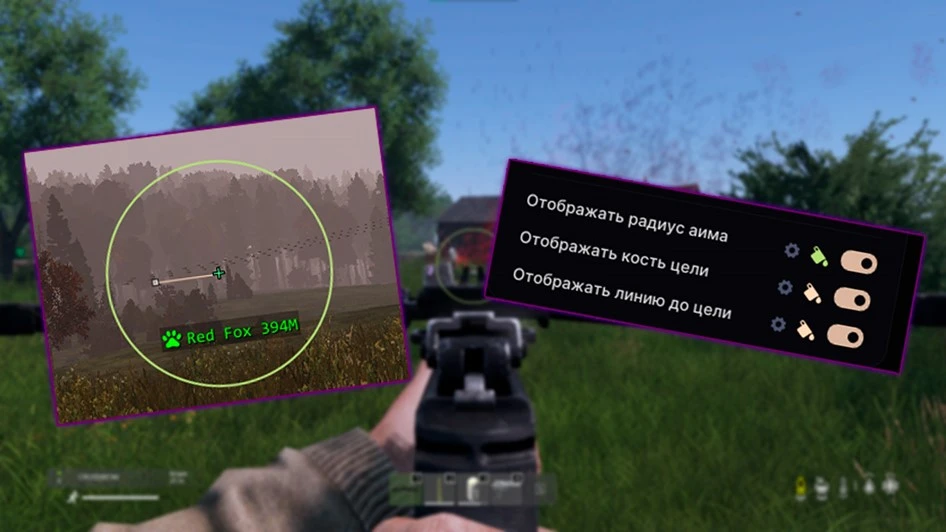
For more convenient aimbot configuration, Authority also provides additional visual elements. Here you can enable:
- a line to the current target within the FOV;
- highlighting of the selected bone;
- display of target acquisition;
- aimbot's radius of action.
Such elements help to better understand how the aimbot works during PvP and which targets it selects at any given moment.
Practical experience using the DayZ Authority aimbot
Speaking of real use, the aimbot in DayZ Authority feels like a truly flexible system, not just an "auto-aim."
Vector Aim is great for more careful play and long-term use on community servers. Silent Aim is noticeably more aggressive and more focused on fast PvP/PvE without extra shooting control. Magic Bullet is a maximally risky mode that is more suitable for aggressive configurations and official and vanilla servers without admins. It is precisely due to the different modes and deep configuration that the aim system remains one of the strongest sides of DayZ Authority.
How the Wallhack in DayZ Authority works: Overview of the ESP component
If the aimbot in DayZ Authority is primarily felt as a PvP tool, then ESP is a full-fledged system for controlling the entire game. It is through ESP that the player receives most of the information about the surrounding world: the location of players, infected, loot, useful objects, and points of interest on the map. For DayZ, such functionality plays a particularly large role. The game itself is heavily tied to poor visibility, distance, and player attentiveness. Dense forests, tall grass, fog, shadows, complex terrain, and a huge number of small objects constantly interfere with normal spatial orientation. Even experienced players often miss targets literally a few tens of meters away, especially while moving or in bad weather. That is why a good ESP in DayZ often gives even more advantage than an aimbot. The ability to see a player in advance, assess the situation, understand the enemy's direction of movement, or notice an ambush in the forest directly affects survivability and the pace of the game. In the case of Authority, the developers clearly placed a serious emphasis on the convenience and flexibility of the ESP system. There is no feeling of a cheap "spammed" wallhack that simply fills the screen with chaotic text and colored squares. On the contrary — most elements can be finely tuned to adapt the interface to your own playstyle.
Player ESP: displaying players through walls
ESP on players in Authority feels quite flexible and at the same time not visually overloaded. The user decides how much information to display on the screen and how "clean" the interface should remain during the game. In its basic version, ESP can show player nicknames, distance, weapon in hand, and health status. But if desired, the interface can be made much more detailed — add skeletons, boxes with different display styles, gaze direction, and various auxiliary indicators. Almost every element is configured separately: colors, transparency, size, and location of information on the screen change. In practice, such flexibility is much more useful than it seems at first. In DayZ, the screen is very easily overloaded with unnecessary information, especially on PvP servers with a large number of players, infected, and loot around. In many cheats, ESP under such conditions quickly turns into a chaotic set of text and lines, making it difficult to navigate during an active firefight.
In Authority, the situation is noticeably better. Thanks to the customization system, ESP can be assembled according to your own playstyle. For example, leave only minimal information about nearby players for a more "legit" game or, conversely, enable maximally detailed display for full control of the surrounding situation. Special mention should be made of the built-in preview system directly inside the cheat menu. The user can see in advance exactly how the ESP will look after changing settings, and also freely move individual interface elements via drag-and-drop. In practice, this turns out to be a handy little thing, especially during long-term play, when you start to notice how much the placement of elements affects the readability of ESP during PvP. For example, health can be placed to the side of the player model, weapon moved down, and distance left on top. When there is a lot of information on the screen, such configuration really helps to read the situation faster and get less distracted during firefights.
Zombie ESP: infected visible across all of Chernarus
ESP on infected in Authority is implemented much simpler than Player ESP, but it still remains a useful part of the overall functionality. This is especially felt in situations where zombies are not just a PvE map element but a full-fledged factor affecting PvP and movement across locations. In DayZ, infected often become a problem not because of the direct threat, but because of the noise and revealing of position. Zombie aggro during looting or a firefight often reveals the player's location earlier than the contact with the enemy itself. Because of this, the ability to see infected around buildings, in forests, or behind objects in advance significantly simplifies situational control. At the same time, ESP on zombies in Authority is made quite neatly and does not turn the screen into chaos with dozens of markers. The user can separately adjust the display distance, visual style, and, if necessary, completely disable Zombie ESP, leaving only players and loot. In practice, many use infected rather as an additional source of information about the presence of other players. For example, by the movement or aggro of zombies near a village, you can roughly understand that someone has recently passed through the location or is still nearby. In combination with Player ESP, such small details help to read the overall situation around much faster. Zombie ESP feels especially useful at night, in dense forests, and on custom/modded servers with an increased number of infected or servers focused on PvE, where navigating without such display becomes much more difficult.
Inventory Preview: see the contents of players' backpacks
What really distinguishes Authority from many other DayZ cheats is Inventory Preview, i.e., a full-fledged view of players' inventories directly through ESP. The function is implemented quite conveniently and feels like a full part of the overall ESP system. By hovering over a player, you can quickly see their equipment, weapon, and inventory contents without having to approach closely or interact with the body after a kill. In practice, such information gives a very serious advantage. Not only in PvP but also in ordinary decision-making during the game.
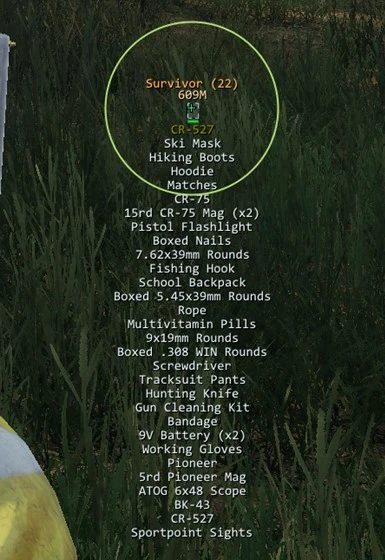
For example, even before the start of a firefight, you can roughly understand:
- how well-armed the enemy is;
- if they have rare loot;
- how "fat" the target looks;
- whether it's worth spending resources on the fight at all.
In DayZ, such things are especially important due to the high value of loot and the length of progression. Sometimes one unsuccessful firefight can cost several hours of gameplay, so the ability to assess the potential benefit of a contact in advance feels very useful. Inventory preview performs especially well during base raids and gameplay on official servers. For example, you can determine in advance who is coming out of the base, how well-equipped the player is, or whether it makes sense to set up an ambush on a particular target. Additionally, the function helps well when scouting groups of players. Even a quick glance at the inventory allows you to quickly understand the level of equipment of a squad and roughly assess who you will be facing. At the same time, the system itself works quickly and does not overload the interface with extra windows. All information appears directly through ESP during normal gameplay, making inventory preview feel like a natural extension of the overall wallhack system, rather than a separate "experimental" feature just for show.
Friend and ally system in the Authority cheat
Special mention should be made of the friend system — a small but quite useful feature for those who play DayZ not solo but in a group. In Authority, you can manually add players to a friends list, after which the cheat will separately mark teammates via ESP and exclude them from aimbot operation. Everything is implemented quite simply: the desired player is added in just a few clicks directly through the cheat menu. In practice, this function turns out to be more useful than it might seem at first. In DayZ, firefights are rarely "clean" — especially in forests, inside buildings, or at night, when there is a lot of visual noise, infected, and moving players around. In such situations, the ability to quickly distinguish an ally from an enemy really helps to avoid accidental team kills, especially when using aggressive ESP or aimbot configs. Additionally, the friend system simply makes team play more comfortable. Instead of constant clarifications in voice chat, the player immediately sees where their teammates are and how they are moving relative to the group. For constant squad play, such a function quickly ceases to be perceived as a "nice little thing" and becomes a normal part of the gameplay.
Additionally, the ESP system of Authority contains a large number of smaller auxiliary settings that themselves do not look critically important, but together noticeably affect the comfort of using the cheat. This includes Visible Check, color settings, transparency of individual ESP elements (Alpha), snapplines, various Box ESP options, display of player gaze direction, and other visual details. Such features are especially felt precisely during long-term play, when you begin to gradually adjust the interface to yourself. For example, someone prefers a maximally minimalist ESP with thin lines and muted colors, while someone, on the contrary, assembles a bright and maximally informative interface for aggressive PvP. Authority gives a lot of freedom in such settings, which is why ESP does not feel like something rigidly fixed — it can be gradually adapted to your own habits and playstyle.
Loot ESP: Displaying items on the map
Separately from Player ESP, Authority implements a full-fledged loot display system, and it can be called one of the strongest and most developed parts of the entire software. For DayZ, Loot ESP plays a huge role in general. The game is directly tied to resource search, and most of the players' time is spent on looting, moving between points of interest, and gradual equipment progression. Because of this, a good Loot ESP in real gameplay often feels more useful than many "loud" PvP functions. At the same time, the problem with most DayZ cheats is that their Loot ESP quickly turns into visual garbage. The screen literally gets filled with item name text, and after just a few minutes it becomes difficult to navigate the location normally. This is especially felt in cities, military objects, and hard-modded servers with a huge number of items on the map. In Authority, the developers clearly tried to move away from this problem. The main emphasis here is not just on displaying loot, but specifically on filtering convenience and interface readability during real gameplay. In DayZ Authority, Loot ESP can be divided into two modes.
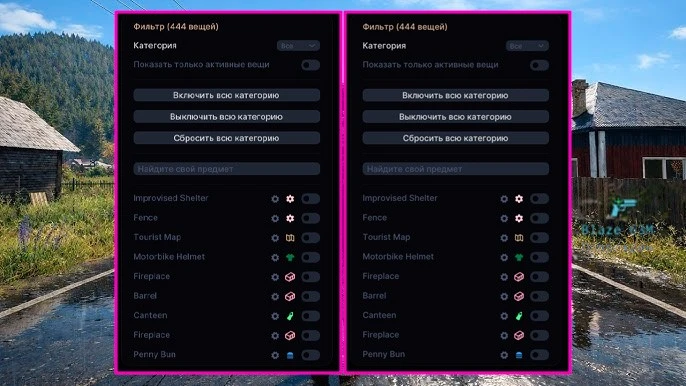
Displaying loot by category: Category Filter ESP
The first mode is the classic category filter. In it, ESP displays items according to selected categories, which is especially convenient in the early stages of the game after a wipe or during normal looting, when almost any useful loot is suitable for the player.
For example, you can separately enable the display of:
- weapons — M4A1, LAR, KA-M, VSD, AUR AX, DMR, Blaze, etc.;
- clothing — Plate Carrier, Hunter Jacket, Tactical Helmet, Assault Vest, etc.;
- medicine — Epinephrine, Blood Bag, Morphine, etc.;
- food and drinks;
- tools;
- building materials;
- backpacks;
- car parts;
- ammunition and magazines.
This mode is especially noticeable at the start of a wipe or after character death, when you need to restore a basic equipment set as quickly as possible. Instead of a long manual inspection of buildings, the player immediately sees everything useful around and can collect a starting set literally in a few minutes. At the same time, the category filter helps not only beginners. Even experienced players in DayZ constantly miss useful loot — especially in dark buildings, tall grass, cluttered rooms, or on modded servers with a huge number of objects. In such situations, ESP noticeably speeds up the pace of the game itself and allows you to spend less time on the routine search for items.
Displaying specific items in ESP: Custom Filter
But Loot ESP truly begins to shine precisely with the Custom Filter. In this mode, the player themselves selects which specific items should be displayed via ESP, and it is this system that feels most useful in the middle and end of a wipe. As progression in DayZ continues, the player's needs become much more specific. After a few hours of play, there is rarely a need to see absolutely all the loot in a row — usually, a search begins for specific things for a particular task. For example, NBC suit elements for contaminated zones, explosives and tools for base raiding, car parts for vehicle repair, or rare magazines and ammunition for a specific weapon.
It is in such situations that the custom filter is much more convenient than the usual Loot ESP for all items. The screen is not cluttered with dozens of useless items, and the player sees only really important loot that they need right now. This is especially noticeable on modded servers, where the number of items on the map can be huge and navigating without filtering becomes much more difficult. As an alternative, you can use the Battle-Mode function. It turns loot display on and off with a key press, while keeping ESP on players active. Thus, allowing you to reduce the amount of information on the screen and enable Loot ESP only when necessary.
World ESP and MapHack: see points of interest and custom markers on the map
In addition to classic ESP for players and loot, Authority also implements a navigation marker system. The cheat can display various points of interest on the map and in the game world — military bases, airfields, cities, villages, and other important locations. This function is especially useful for beginners who are still poorly oriented in DayZ, but experienced players also use such markers for faster movement between loot routes and key points on the map. Special mention should be made of support not only for official maps like Chernarus, Livonia, and Sahkal, but also for popular modded locations, including Namalsk and Deer Isle.
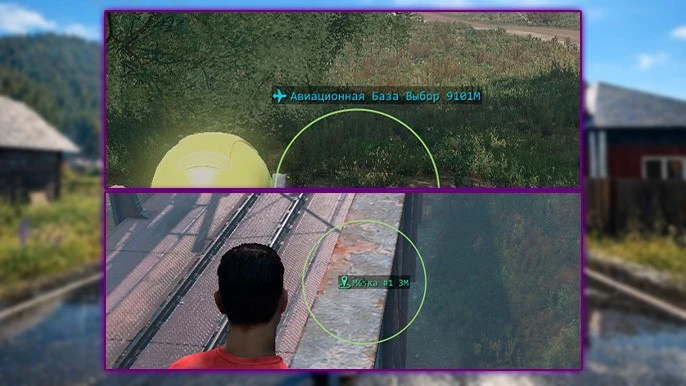
For DayZ software, this is a rather important point, since support for modded maps is implemented far from every major project. Additionally, Authority features a system of custom markers. The player can manually mark desired points on the map — for example, bases, stashes, vehicles, or potential raid locations. Each marker is assigned a separate name and color, which keeps the system convenient even with a large number of saved points. In real gameplay, such functions are not as "loud" as ESP or aimbot, but they are the ones that most affect overall comfort during long gaming sessions. This is especially noticeable when playing in a group, during night movements, or on long routes through forests and remote parts of the map.
Authority Exploits for DayZ
In addition to ESP and aimbot, DayZ Authority also has a separate category of exploits. Unlike visual tools, which mainly provide additional information about the surrounding world, exploits directly affect the gameplay and individual mechanics of the game itself. At the same time, they are implemented quite differently. Some functions are perceived more as convenient tools that simply make gameplay more comfortable and remove some irritating elements of DayZ. Others, on the contrary, noticeably change the gameplay itself and are more related to aggressive or outright cheat functionality. One of the most useful and relatively "safe" exploits is Zoom Hack. When holding the assigned key, the function reduces the FOV and zooms in on the area near the crosshair, allowing you to see distant objects much better. In DayZ, such a function feels especially useful due to the huge engagement distances and the large number of open spaces. Zoom Hack is well-suited both for reconnaissance of the area and for shooting at medium and long ranges, where it is often difficult to spot a player without optics or binoculars. Next to it is the FOV change function. Essentially, this is a simpler but constantly used utility function that allows you to increase the field of view from both first and third person. In real gameplay, expanded FOV indeed makes movement more comfortable — especially in cities, forests, and close-range firefights, where it is important to control as much space around the character as possible.
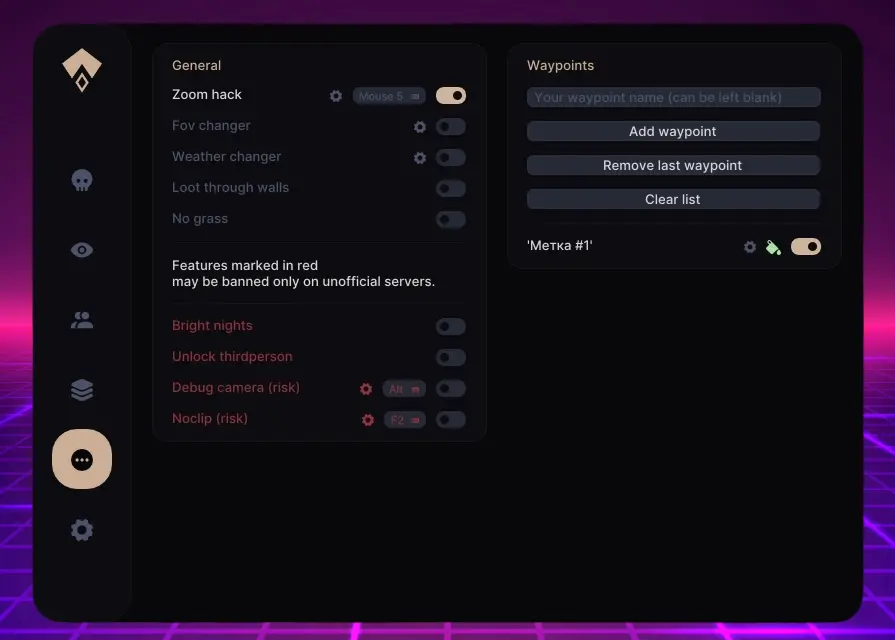
The system for visual weather modification looks quite interesting as well. In Authority, you can separately adjust fog, rain, and overall overcast, making the image much cleaner and more readable. This function is especially noticeable during PvP in bad weather, when the standard DayZ picture becomes too "blurry" and overloaded with effects. It is important to understand that the changes only affect the visual part of the game on the player's side — rain and weather effects on the server continue to work as usual. Also in this category are grass removal and Bright Nights. The first function removes grass and small vegetation, making it easier to spot lying loot and players in tall grass. Bright Night, in turn, significantly increases brightness at night time, allowing relatively comfortable movement across the map even without NVGs, a flashlight, or other light sources. Such functions can hardly be called game-changing, but in everyday gameplay they feel quite useful and quickly become part of the usual experience in the world of DayZ.
Special mention should be made of Loot Through Walls — an exploit that allows interacting with items through obstacles at a short distance. The function works within a radius of about a few meters and is especially useful in situations where the desired item is behind a wall, inside a closed object, or simply lying in an inconvenient place. For correct operation, it usually requires quite precise aiming at the item itself or its icon via Loot ESP. In practice, such a function is more often perceived as a convenient tool for looting rather than an aggressive exploit. Debug Camera and Noclip, however, are much riskier functions. Debug Camera allows you to freely move the camera around the character without moving the player model itself. This tool can be used for territory reconnaissance, viewing loot inside buildings, or assessing the location of players and objects before a base raid. Noclip works even more aggressively — besides free movement, it also allows full interaction with the world, including shooting and using grenades. It is precisely these functions that significantly increase the risk of detection, especially on community servers with active administration. If utility exploits like FOV change or Bright Night can still be seen as "quality of life improvements," then Debug Camera and Noclip are full-fledged exploit utilities that directly break the basic limitations of the gameplay. Also in this category is the function to unlock third-person view on "1PP only" servers. Authority allows switching between first and third person even on servers where this feature is initially disabled. In practice, this gives a quite serious advantage when scouting corners, buildings, and other enclosed spaces, although it is among the functions that can quickly attract the attention of administration if used carelessly.
Overall, the exploit system in Authority feels quite diverse and at the same time well-divided by level of "aggressiveness." Some functions indeed simply make the game more comfortable and convenient, while others open a completely different gaming experience, far beyond the scope of ordinary DayZ.
HWID Spoofer in DayZ Authority
Special mention should be made of the built-in HWID Spoofer, which in the case of DayZ Authority is supplied as part of the overall software ecosystem. For DayZ, this is especially relevant due to the BattlEye anti-cheat, which, in addition to regular account bans, also actively uses HWID bans — restrictions that are tied not to the account but directly to the device itself. Simply put, after receiving such a ban, the anti-cheat begins to recognize the computer by the identifiers of its components, causing new accounts to potentially receive a block almost immediately after logging into the game.
It is precisely to bypass such restrictions that the spoofer is used. In the case of Authority, the SMG BE Spoofer is used — a solution from the same developers as the cheat itself. It works on a fairly standard principle: the program temporarily changes the identifiers of the system and components, causing BattlEye to perceive the device as a new PC. The main advantage of the built-in spoofer is the absence of a need to use third-party solutions. For many DayZ cheats, this is indeed a problem: separate spoofers can conflict with the software itself, cause key binding issues, or simply work unstably. In the case of Authority, such complications are noticeably fewer precisely because the spoofer was originally developed for a specific product. At the same time, the usage process itself is implemented quite simply. The spoofer is integrated directly into the cheat's launch system, and when starting the software, the user immediately receives an offer to apply the spoofer before entering the game. But with all the advantages, it is important to understand the limitations of such solutions. First, the effect of the spoofer is temporary — after rebooting the computer, the procedure must be performed again. Second, the spoofer is not an "unban" for an account. If an account has already received a ban, spoofing will not remove the ban and will not allow playing on the already blocked profile. Additionally, it should be considered that such solutions are primarily designed specifically for BattlEye. For other anti-cheats, correct operation is not guaranteed, and on modded servers with local bans, the spoofer will also not help, since such restrictions are usually issued by the server administration itself, not by the anti-cheat.
System requirements, stability, and cheat launch
Despite the fairly large functionality, DayZ Authority overall gives the impression of quite stable and mature software. This is especially noticeable compared to many DayZ cheats that require a huge number of third-party programs, complex launches, or constant manual configuration before each gaming session. In the case of Authority, the developers have tried to simplify the launch process as much as possible. The cheat does not require Discord overlays, third-party injectors, additional software from NVIDIA or AMD, or other auxiliary programs that often cause compatibility problems. Essentially, the user only needs the cheat client itself and a correctly configured game. Mandatory requirements include Windowed mode, disabled vertical synchronization, and some graphics settings related to anti-aliasing. For experienced DayZ users, such conditions are unlikely to be a problem, but the very fact of the absence of a large number of external dependencies still noticeably simplifies the use of the software on a permanent basis. Additional convenience is added by the config system. Instead of having to manually configure ESP, aimbot, and other functions each time, the player can pre-save several ready-made profiles for different game scenarios — for example, a separate legit config for community servers and a more aggressive set of settings for vanilla PvP. However, the software is not completely without problems.
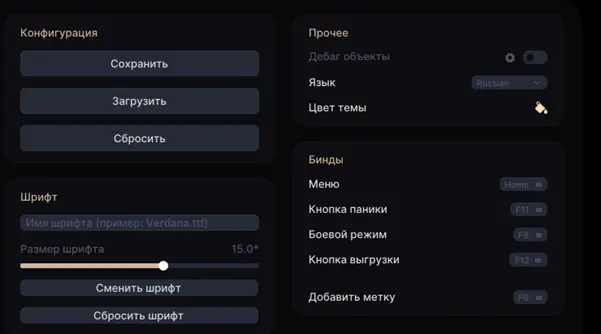
The main drawback of Authority at the moment is related to compatibility with Windows 11. The cheat works normally on Windows 10 and older versions of Windows 11, but current builds like 24H2 and newer are officially not supported and may cause launch errors. For some users, this could indeed be a serious problem, especially given Microsoft's gradual transition to new versions of Windows 11. In such situations, the only options are either to roll back the system to a supported version or to use alternative solutions with support for more current Windows builds — for example, DayZ Dullwave, which which has received support for more modern system compatibility. Among the smaller problems, one can note the unstable operation of ESP on corpses. At the time of writing this review, this function is present, but it does not always work perfectly — some dead players may periodically not be displayed via ESP. It is difficult to call this a critical drawback, but against the background of the overall level of Authority's polish, such small things are still noticeable. Otherwise, the software feels quite stable for everyday use. This is especially true for the basic systems like ESP, loot filters, and aimbot, which work predictably and do not create a feeling of a "raw" or unstable project.
Advantages and disadvantages of DayZ Authority
Let's talk about the advantages of this solution. One of the main strong points of DayZ Authority remains its flexibility. The software is not limited to one playstyle and allows you to assemble both a relatively careful legit config for community servers and a maximally aggressive PvP configuration for official ones. This is especially noticeable thanks to the Mouse Emulator Aimbot, deep ESP configuration, and convenient config system. Special mention should be made of the quality of Loot ESP and the overall visual system. Item filtering, icons instead of constant text spam, inventory preview, and interface customization make using ESP truly convenient in long-term gameplay, not just "impressive" for the first few hours. The strong points also include:
- built-in HWID Spoofer;
- support for modded maps;
- convenient navigation marker system;
- a large number of exploits;
- no dependence on overlay programs and third-party software;
- fairly stable operation of basic functions.
Compared to many other DayZ cheats, Authority feels not like a collection of disparate functions, but as a coherent and well-developed project with a clear architecture and a large number of settings for different game scenarios.
This is where the main advantages of DayZ Authority end; next, we will analyze the cons and disadvantages of this solution. The main drawback of Authority at the moment is compatibility with Windows 11. Current versions of the system like 24H2 and newer are officially not supported, which can be a serious problem for some users. In some cases, the only option is to roll back Windows or look for alternative software. Additionally, some exploits look quite risky for constant use on community and modded servers. Debug Camera, Noclip, Magic Bullet, and some other mechanics can quickly attract the attention of admins, especially on servers with active moderation and tools for observing players. Also, there are occasional minor issues like unstable display of corpses via ESP. It is difficult to call this a critical drawback, but against the background of the overall level of software polish, such shortcomings are still noticeable. Otherwise, Authority does not have many serious weak points — especially if you consider the software as a large multifunctional DayZ project rather than a narrowly specialized legit cheat for maximally careful play.
Conclusion
At the moment, DayZ Authority gives the impression of one of the most comprehensive and feature-rich cheats for DayZ. And this is not just about the number of individual functions, but about how well they are adapted to the very structure of the game and real-game scenarios. Authority feels equally confident both in PvP and in more "everyday" survival gameplay. The flexible ESP system, advanced Loot ESP, navigation markers, inventory preview of players, and a large number of exploits make the software useful not only during firefights but also in regular gameplay — during looting, territory reconnaissance, map movement, and raids. The aimbot implementation also stands out. For DayZ, the presence of a full-fledged Mouse Emulator Aimbot is still a rather rare phenomenon, especially given the specifics of BattlEye and the difficulty of creating a truly "human-like" vector aimbot. Judging by the behavior of the aim in the game, the developers of Authority paid a lot of attention to this aspect, and it is precisely because of this that legit configs here feel noticeably better than in many other DayZ projects.
However, the software cannot be called a universal solution for absolutely any conditions. Some exploits remain quite risky for active play on modded servers, and compatibility limitations with modern versions of Windows 11 may be a serious drawback for some users. Nevertheless, if you consider Authority as a large multifunctional DayZ cheat with a focus on flexibility, customization, and a wide range of gameplay tools, then the software definitely looks like one of the strongest solutions on the current market. Authority is especially well-suited for players who need not just a basic Wallhack or Aimbot, but a full-fledged tool for different game scenarios — from ordinary survival gameplay and long loot routes to PvP, raids, and aggressive rage on vanilla.
Other articles by the author: