Private Cheats for Battlefield 5 (BF5 Hacks)
Reliable gaming solutions for Battlefield 5 in the WH-Satano store
List of Cheats for Battlefield 5
Battlefield V — a multiplayer military shooter released in 2018. The game takes players back to the Second World War and offers large-scale combat on land, in the air, and at sea. In Battlefield 5, special attention is paid to team play, the use of military vehicles, choosing a soldier class, and tactical control of territory. One of the key features of Battlefield V is massive online battles with a large number of players fighting simultaneously. Success depends not only on aim and reaction speed, but also on map knowledge, proper positioning, timely enemy detection, and coordinated teamwork. In fast-paced combat, even a small information advantage can significantly affect the outcome of a firefight.
To expand the gameplay possibilities, private cheats and a mod menu are available for Battlefield V. With their help, you can improve automatic aiming at enemies, detect enemy players through walls and other obstacles, track their movements with a radar, and use additional customization tools. Depending on the chosen cheat, various functions are available, including Aimbot, ESP, Wallhack, and Radar Hack. They let you approach in-game situations in different ways: react faster to enemies appearing, control positions on the map, get more information about what is happening around you, and level up faster overall. Below, we take a detailed look at the main features of cheats for Battlefield 5, break down the specifics of each module, and explain what to pay attention to when choosing the right software.
Interested in Cheats for Battlefield 5? Check out other sections of our store: "Cheats for Battlefield", "Cheats for Battlefield 1", "Cheats for Battlefield 6", "Cheats for Battlefield 2042".
Aimbot, Aim Assistance for Battlefield V (BF5)
The Aimbot for Battlefield V is an automatic enemy-locking feature that helps you acquire targets faster and improve shooting accuracy. In the large-scale battles of BF5, where enemies can appear from different directions, take cover, and constantly change positions, timely targeting plays an important role. With the Aimbot, you can simplify aiming, set up priority target selection, and adapt the function's behavior to your own playstyle.
Main Aimbot Features
- Enable — turns automatic targeting on and off.
- Mode — lets you choose the aimbot's operating mode: regular aiming with crosshair movement, or Silent, where the shot direction changes without visibly moving the crosshair toward the target.
- Activation Key — assigns the key that activates aiming when pressed.
- Key Behavior — selects the activation method: holding the key down or toggling the mode with a repeated press.
- Aim Point — selects the aiming point. Head and chest are available, letting you define the preferred targeting area.
- Target Priority — configures the priority of enemies the aimbot should switch to.
- Target Lock — locks the selected target so aiming does not switch to other enemies unnecessarily.
- Prediction — a function that predicts target movement, taking into account its motion and bullet drop. Helps correct aiming when shooting at moving enemies.
- Visible Only — restricts the aimbot to visible enemies only, excluding targets behind obstacles.
- FOV — adjusts the target selection radius around the crosshair. Defines the area within which the aimbot can capture enemies.
- Show FOV — displays the FOV circle on screen, making it easier to control the set aiming area.
- Smoothness — adjusts the speed and smoothness of crosshair movement toward the selected target.
Tuning Aiming to Your Playstyle
The Aimbot in Phoenix BF5 offers several parameters that let you change the character of automatic targeting. For example, you can choose between regular and Silent modes, set your preferred aiming point, and define enemy selection priority. The Target Lock feature helps you keep the selected target, while Prediction accounts for enemy movement and the ballistics of the shot.
The FOV and Smoothness settings deserve special attention. The first defines the target capture area, and the second is responsible for aiming smoothness. As a result, the user can find the right Aimbot configuration for Battlefield V based on personal preferences and the specifics of in-game situations.
Wallhack, ESP, WH for Battlefield 5 (See Players Through Walls)
ESP for Battlefield V is a visual detection feature for players and military vehicles that provides additional information about what is happening on the battlefield. With it, you can see the location of enemies through walls, cover, and other obstacles, track their movements, and assess the state of targets. In the large-scale battles of Battlefield 5, this information helps you navigate the map better, spot threats in advance, and choose a better moment to attack or change position.
Players Wallhack (ESP)
The main Players ESP module is responsible for displaying soldiers on the battlefield. In addition to visual markers, it can show various character stats, letting you assess the situation faster and identify priority targets.
- Boxes — displays boxes around players. Helps you spot enemies quickly and determine their position.
- Skeleton — displays the character's skeleton, making it easier to see the soldier's position and orientation.
- Nicknames — shows players' names above their characters.
- Health — displays the health bar and numeric HP value.
- Weapon — shows the name of the weapon the player is currently using.
- Magazine — displays the weapon's magazine capacity.
- Distance — shows the distance to the detected character.
- Max Distance — limits the maximum display distance of the ESP.
- Enemies Only — hides allies, leaving only enemies on screen.
- Show Dead — lets you display dead players.
- Visibility Check — changes the color of visual elements depending on whether the target is visible or behind an obstacle.
- Visible Only — hides players who are behind obstacles.
- Distant ESP — displays compact player labels at long distances without boxes.
- Label Position — adjusts the placement of text labels.
- Visibility — displays a marker indicating whether the target is visible or not.
- Team — a marker that lets you distinguish allies from enemies.
- Death — a visual indicator of a player's death.
- Low Health — highlights characters with low health.
- Suppressor — displays information about whether the enemy's weapon has a suppressor attached.
- Loot Bags — displays bags with items left by dead players.
Vehicle ESP
Battlefield V offers a variety of ground and air vehicles that can significantly affect the course of battle. A separate Vehicles ESP module lets you detect vehicles and get information about their characteristics, crew, and condition.
- AABB — highlights vehicles with bounding boxes, making them easy to spot on the battlefield.
- Box Height Offset — adjusts the vertical offset of the box relative to the object.
- Name — displays the vehicle's name.
- Type — indicates the vehicle category.
- Health — shows the vehicle's current health level.
- Enemy Only — hides friendly vehicles so that only enemy machines are displayed.
- Type Filters — filters displayed vehicles by category.
- Seats — information about the vehicle's total capacity.
- Crew Count — displays the number of occupied seats.
- Crew Names — shows the names of players inside the vehicle.
- Repairable — an indicator of whether the vehicle can be repaired.
- Max Distance — limits the display distance of vehicles.
Additional ESP & Wallhack Settings
Beyond the core detection features, Phoenix BF5 offers styling options for visual elements. With them, you can change the appearance of boxes, labels, and other markers to make the interface more convenient and readable.
- Box Style — choose between corner and full-size boxes around objects.
- Fill — adds a fill inside the boxes.
- Glow — a glow effect around the boxes.
- Icons — displays additional icons in labels.
- Text Size — adjusts the text size.
- Offset — adjusts the spacing between ESP elements.
- Colors — changes the colors of visual elements.
- Preview — previews the selected styling.
Thus, ESP for Battlefield 5 is not just a Wallhack for detecting enemies through walls. It is a full-fledged information tool that lets you track players, assess their condition, see the weapons they use, and monitor military vehicles. Thanks to flexible display settings, you can adapt the interface to your own preferences and keep only the information that really matters on screen.
Battlefield 5 Radar Hack (BF V Maphack)
Radar Hack for Battlefield V is an additional tool for detecting enemies and military vehicles that displays their location on a separate radar right during the game. Unlike full ESP, there is no need to render lots of visual elements directly onto characters and objects. Instead, the information is collected in a compact window where you can track the movements of soldiers and vehicles relative to your own position.
In the large-scale battles of Battlefield 5, the radar helps you keep better control of what is happening around you. You can spot approaching enemies in advance, track the movement of enemy vehicles, and get additional information about the situation on the battlefield. This is especially convenient for those who prefer a minimalistic interface and do not want to clutter the screen with a large number of ESP elements.
Main Radar Hack Features
- Players — displays player markers on the radar. Lets you track the position of soldiers relative to your character.
- Vehicles — shows military vehicle markers, helping you control vehicle movement on the battlefield.
- Local Player — displays your own position on the radar. Makes it easier to orient yourself relative to other objects.
- Shape — choose the radar shape: circular or square.
- Grid — enables a coordinate grid for easier orientation on the radar.
- Size — adjusts the radar window size.
- Range — adjusts the viewing radius, defining the area in which objects are displayed.
- Lock Position — pins the radar to the top-right corner of the screen.
- Move — lets you move the radar window freely and choose a convenient location.
Compact Situational Awareness
The main advantage of Radar Hack is the ability to track players and vehicles without being distracted from the core gameplay. All markers are in a separate window, so more screen space remains free to observe what is happening directly in front of your character.
Shape, size, and range settings let you adapt the radar to your preferences. You can pin it to a corner of the screen or move it to another convenient spot. As a result, Radar Hack for Battlefield V becomes a practical alternative to full ESP for those who only need a compact map with markers of surrounding objects.
Mod Menu Cheats for Battlefield 5 (BF V)
The mod menu for Battlefield V is a single cheat management interface that combines several useful game features in one program. Instead of separate tools for automatic aiming, enemy detection, and vehicle tracking, the user gets a common panel through which all available modules can be enabled, disabled, and configured.
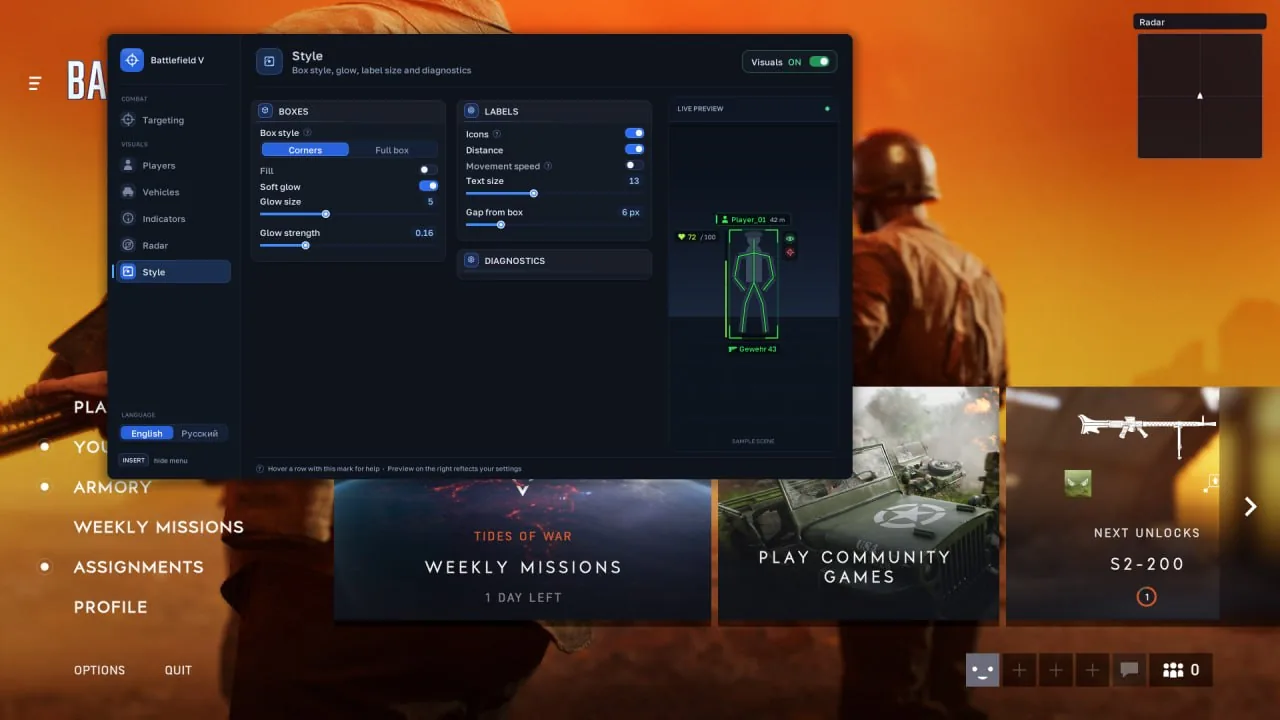
Phoenix BF5 includes main sections such as Aimbot, Players ESP, Vehicles ESP, and Radar Hack. Each of them has its own parameters, so you can not only activate the desired feature but also fine-tune it to your preferences.
Main Mod Menu Sections
- Aimbot — the automatic targeting module. Lets you choose the aiming mode, hit point, target priority, and configure FOV, Prediction, and aiming smoothness.
- Players ESP — displays players with additional information. You can enable boxes, skeletons, nicknames, health, weapons, distance to enemies, and other parameters.
- Vehicles ESP — detects military vehicles, displaying their type, name, condition, crew, and other characteristics.
- Radar Hack — a compact radar with player and vehicle markers. Supports shape, size, viewing range, and on-screen position settings.
- Miscellaneous — additional features, including No Recoil and No Spread, which let you change weapon behavior.
Flexible Visual Element Customization
Phoenix BF5 pays special attention to ESP styling. The user can choose the box style, add fill and a glow effect, change the colors of individual elements, and adjust the size of text labels. Icons and spacing settings between visual elements are also provided.
The Preview function lets you evaluate the selected styling before using it in the game. This helps you pick a convenient way to display information and avoid excessive clutter on the screen.
Convenient Controls and Additional Features
Another advantage of the mod menu is that all main tools are gathered in one place. For example, you can use the Aimbot together with Players ESP to simultaneously get information about enemy positions and configure automatic targeting. Radar Hack, in turn, suits those who need a more compact way to track the surrounding situation.
For added convenience, the interface language can be switched between Russian and English. Thus, Phoenix BF5 offers a comprehensive set of tools for Battlefield V with the ability to individually configure aiming, player display, vehicles, and auxiliary parameters.
Best Hacks for Battlefield V — WH-Satano Store
If you are looking for private cheats for Battlefield 5, check out the offers at the WH-Satano store. We have been operating since 2015 and offer software for popular online games, paying attention to product quality, ease of purchase, and customer support.
Why choose WH-Satano?
- Tested cheats — the software is verified before being listed in the catalog. We strive to offer up-to-date solutions with detailed descriptions of their features.
- Operating since 2015 — over the years, the store has earned the trust of regular customers and built a reputation in the game software market.
- 24/7 support — our specialists are ready to help with questions about purchasing, access, and using the products you buy.
- Competitive prices — we offer affordable pricing without unnecessary markups.
- Convenient payment methods — various payment options are available, including local and international methods.
- Detailed product descriptions — product pages let you review features, terms of use, and installation instructions.
In the WH-Satano catalog, you can find the right cheat for Battlefield V based on the features you need. Before purchasing, we recommend studying the product description, checking compatibility, and reviewing the available functions.
How to Buy Cheats for BF 5 in 2026?
You can buy cheats for Battlefield 5 at WH-Satano in just a few steps. The ordering process is simple and requires no special technical knowledge.
- Open the Battlefield V category — go to the corresponding catalog section and review the available offers.
- Choose the right product — compare the listed cheats and decide on the set of features you need.
- Study the description — pay attention to the features of the Aimbot, ESP, Radar Hack, and other available modules.
- Check compatibility — make sure the selected product suits your game version and operating system.
- Choose a subscription period — if different access durations are available, pick the one that suits you.
- Add the product to the cart — after selecting the required options, proceed to checkout.
- Fill in the required details — provide the information requested by the store to process your purchase.
- Select a payment method — use one of the available options and complete the payment.
- Receive your access details — after the order is processed, you will be provided with the information needed to use the product.
- Follow the instructions — review the recommendations on the product page and perform the necessary steps to launch.
If you have any questions during purchase or use, contact the WH-Satano support team. Our specialists will help you with ordering and the next steps.
Paid and Undetected Hacks for Battlefield 5
Battlefield V is a large-scale military shooter where accuracy, reaction, map knowledge, and battlefield awareness matter. Private cheats let you expand the standard game capabilities and gain additional tools for interacting with the game environment.
Aimbot helps you set up automatic targeting and target selection, ESP and Wallhack let you detect enemies and get information about their condition, while Vehicles ESP enables you to track military vehicles and their crews. Radar Hack, in turn, displays players and vehicles on a compact display without overloading the main screen.
If you want to find the right software for Battlefield 5, explore the offers in the WH-Satano catalog. Review the features of each product, choose the option that suits you, and place your order in a convenient way. And our support team is always ready to help with any questions.