This article contains instructions for using the following products: Vlone Rust Alkad.
Software Guide
Instructions for running Vlone cheats:
- After successful payment, you will receive a key to activate access to the cheat, a link to this page, and a link to the loader.
- Prepare to download and run the loader:
- Completely disable Windows Defender (Real-time protection). If you have other antivirus programs installed on your PC, we recommend uninstalling them, as they may prevent the software from running correctly.
- We strongly recommend disabling Windows Defender using Defender Control, which can be downloaded from this link. The password for the archive is sordum.
- Also, in addition to Windows Defender, you need to disable Core Isolation in Windows Security settings for Vlone to work.
- Now that everything is ready, go to your Vlone account and activate your key. You will receive a link to your personal account along with your key and a link to these instructions.
- Download the cheat archive (loader) from your personal account and unzip it to your desktop.
- Rename the cheat loader, specifying your key as the file name.
- Run the loader as administrator.
- In the first window, you will need to press F2.
- Wait for the music to finish playing.
- After a while, a message will appear indicating that the cheat has been successfully loaded.
- Launch the game.
- In the game's main menu, press F2 to complete the software injection.
- The Vlone cheat has been successfully launched! Join the server.
Furthermore, the software menu can be opened/closed by pressing the Insert key.
Video instructions for launching
A video will be added here in the future.
Known errors and solutions
Here we have collected some known errors and solutions:
- The most common issue is Windows Defender/Antivirus being enabled. Completely disable Windows Defender (as described earlier) and uninstall other antivirus software.
- Update Visual C++ libraries. You can download them from this link.
- You should also update DirectX. You can download it from this link.
- Faceit, Riot Vanguard and ACE (AntiCheatExpert) anti-cheat software installed on your PC can also interfere with the software. Uninstall them using Add or Remove Programs.
- To run the cheat, you must also disable Reputation-Based Protection.
- Open the START menu and search for "Reputation-Based Protection." Open this window.
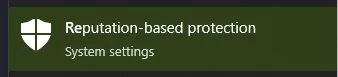
- In the window that opens, disable all options.
- Open the START menu and search for "Reputation-Based Protection." Open this window.
- Sometimes the software may not launch due to problems connecting to the servers. In this case, you should try running the loader with the VPN enabled.
If you encounter any difficulties, you can always contact our support team for help via the online chat widget here on the website.
You can follow all our news and updates at Our Telegram channel.
We also recommend checking out our other Cheats for Rust No Steam.